What a purchase order is and who uses one
A purchase order is a written instruction from you to a supplier, confirming what you want to buy, at what price, and when you need it. It fixes the terms of the deal before any money changes hands, so both sides know exactly where they stand.
Sole traders, freelancers, contractors, and small businesses all use them. There is no legal requirement to raise a PO for every order, but the habit pays off quickly. If a supplier delivers the wrong goods or bills you at the wrong price, a signed-off purchase order is the thing that settles the dispute.
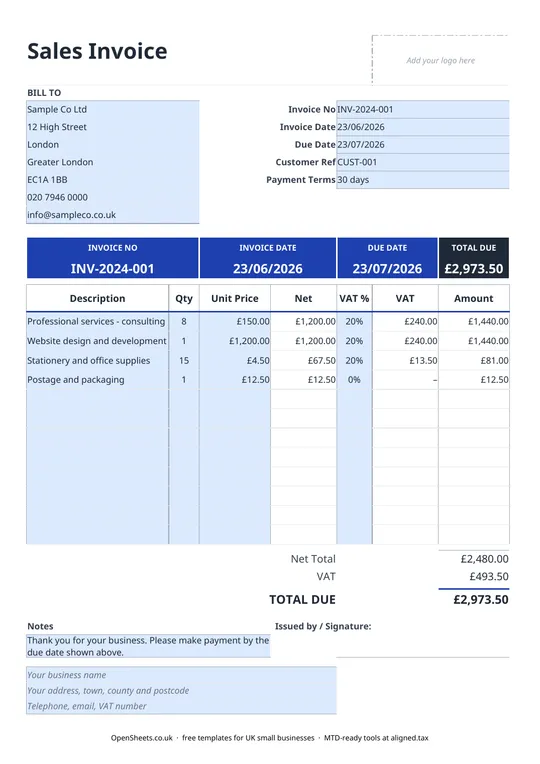
Many larger businesses will not pay a supplier invoice unless it has a PO number attached, so if you sell to bigger organisations you will probably already know them from that side of the fence.
The fields on this template and what they mean
Here is what each section does.
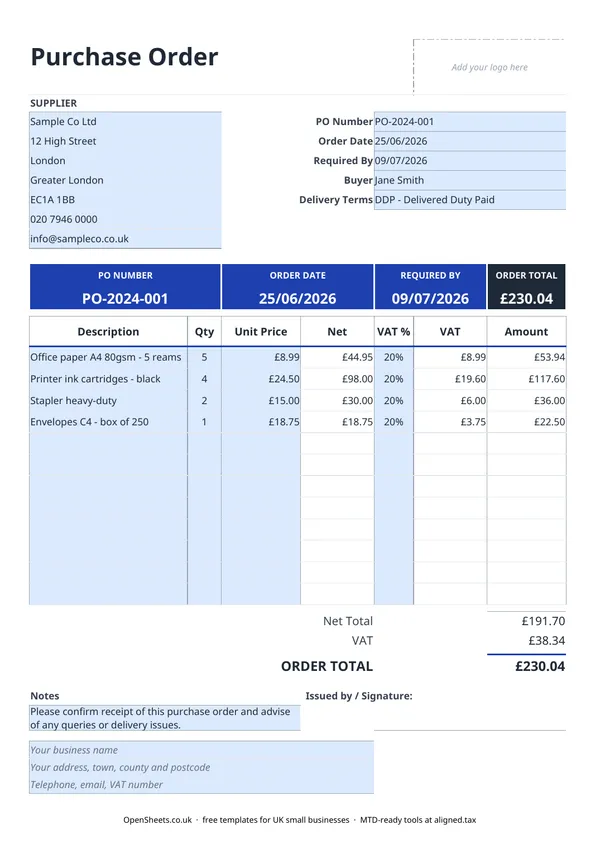
Supplier details go top left: the company name and address of the business you are buying from.
The PO header carries the most important reference information: the PO number, the order date, the date you need delivery by (Required By), the name of the person raising the order (Buyer), and the agreed delivery terms. Delivery Terms on a UK purchase order typically follow Incoterms conventions (DDP, EXW, and so on) for international orders, or a plain description for domestic ones (“delivered to site”, “collected by us”). If in doubt, spell it out plainly rather than rely on an abbreviation the supplier may read differently.
The line-item table is where you list exactly what you are ordering: a description, the quantity, and the unit price. The template calculates the net amount per line, the VAT, and the line total automatically.
Totals at the bottom show the Net Total, the VAT amount, and the Order Total. If you are not VAT-registered and your supplier is not VAT-registered either, the VAT column will be zero and the Order Total equals the Net Total.
Notes is a free-text field for anything extra: special delivery instructions, part-shipment conditions, or a reminder to contact you before substituting any item.
Your business details sit at the foot of the page: your trading name, address, and contact details, and your VAT number if you are registered.
VAT on purchase orders
When you are buying from a VAT-registered supplier, they will charge you VAT. The standard rate is 20% for most goods and services. Some categories carry the reduced rate (5%) and some are zero-rated. The VAT column on this template lets you set the rate per line so you can see the full cost before you commit to the order.
When the goods or services arrive, the supplier sends you a VAT invoice. That invoice, not the purchase order, is what you use to reclaim the input VAT through your VAT return. Keep the purchase order and the matching VAT invoice together in your records.
If you are not VAT-registered, ignore the VAT column entirely. You pay the prices you see in the Net column and that is the full amount.
Common mistakes to avoid
Not filling in the Required By date. Without a clear delivery date on the purchase order, you have less standing to object if goods arrive late. Add it even for routine orders.
Leaving the PO number blank. Your supplier’s accounts team needs a PO number to match your order to the invoice they raise. Without it, payment can be held up even when everything else is correct.
Using delivery terms loosely. “Delivered” is ambiguous. Who pays carriage? Who is responsible if the goods are damaged in transit? For domestic orders, a clear plain-English description removes any doubt. For international orders, use a recognised Incoterm.
Treating the purchase order as proof of payment. A purchase order is an instruction to supply. It is not a receipt and it is not a payment record. Your records need both the PO and the supplier’s invoice, plus evidence of payment (a bank statement entry or payment confirmation).
Reusing PO numbers. Like invoice numbers, PO numbers must be unique. If two orders share a number, your records will be confused and reconciliation becomes painful.
Keeping records and Making Tax Digital
The goods and services you buy for your business are deductible expenses. Keep a copy of every purchase order alongside the matching supplier invoice and your payment record. That paper trail is what makes expenses easy to claim and easy to defend.
If your combined income from self-employment and property is over £50,000, Making Tax Digital for Income Tax already applies to you from April 2026. It means keeping digital records and sending HMRC a quarterly summary of your income and expenses. The threshold drops to £30,000 from April 2027 and to £20,000 from April 2028.
If you are approaching those thresholds, Aligned (aligned.tax) is worth knowing about. It is free MTD bridging software that sends your records to HMRC straight from the spreadsheet you already keep.