What a cash book is and why UK sole traders use one
A cash book is a running record of every payment into and out of your business, in date order. It is a simple tool and a very useful one. At the end of any week you can see what has come in, what has gone out, and what your balance is.
HMRC requires sole traders to keep records of their business income and expenses. A cash book is one of the most practical ways to do that. Keep it up to date and your Self Assessment figures are mostly already there when you need them.
What the template records
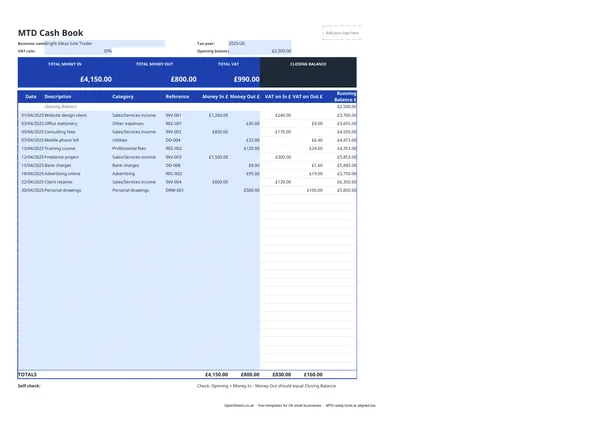
Each row is one transaction. The columns are:
- Date (dd/mm/yyyy)
- Description: what the transaction was, for example “Website design client” or “Mobile phone bill”
- Category: the income or expense type. Sales/Services income, Utilities, Professional fees, Advertising, Bank charges, Personal drawings, and so on
- Reference: your invoice number, receipt number, or direct debit reference
- Money In (£): any income received
- Money Out (£): any expense paid
- VAT on In (£) and VAT on Out (£): for VAT-registered businesses
- Running Balance (£): updates automatically after every row
The summary tiles at the top show Total Money In, Total Money Out, Total VAT, and Closing Balance.
The categories that matter for UK tax
The category column is not just for your own organisation. It maps to the income and expense types HMRC asks about.
Most sole traders have one income category: Sales/Services income. If you have more than one income stream, split them so you can see each one separately.
On the expense side, common deductible costs include office supplies, phone and broadband, mileage and travel (but not commuting), professional subscriptions, advertising, bank charges, and training directly relevant to your trade. Personal drawings are not a business expense. They come out of your profit. It is still worth tracking them here so your bank balance reconciles properly.
If you are not sure whether a particular cost is deductible, the HMRC guidance on allowable expenses for self-employed people is a good starting point, or ask your accountant.
Common mistakes to avoid
Leaving it all until the end of the month. Entering transactions weekly or even monthly is fine. But the longer you leave it, the harder it gets to remember what a cryptic reference means or to track down a receipt. A few minutes each week saves hours come January.
Mixing business and personal transactions. Your cash book should only cover business income and expenses. If you share a bank account for both, you have to filter out the personal stuff each time. A separate business bank account makes this much cleaner and is worth setting up early.
Getting the opening balance wrong. The running balance only makes sense if you start from an accurate figure. Set it to your actual bank balance at the start of the tax year.
Not checking against your bank statement. The self-check formula at the bottom of the sheet confirms that Opening Balance plus Money In minus Money Out equals Closing Balance. That is useful, but it is still worth comparing your cash book total to your actual bank statement. Differences usually mean a missing transaction or a typo.
Keeping digital records and Making Tax Digital
If your combined income from self-employment and property is over £50,000, Making Tax Digital for Income Tax applies to you from April 2026. The threshold drops to £30,000 from April 2027 and £20,000 from April 2028.
Under MTD, you keep digital records of your income and expenses and send HMRC a quarterly summary rather than a single annual return. A spreadsheet cash book kept on a computer counts as a digital record.
The category column in this template maps to the income and expense types HMRC collects in those quarterly updates. When you are ready to file, Aligned (aligned.tax) connects this spreadsheet directly to HMRC’s MTD system and sends the quarterly update on your behalf. You carry on keeping records exactly as you do now. Aligned reads them and does the filing. It is free, and there is no need to move your data into separate accounting software.
A well-kept cash book is most of the MTD work already done. This template is the starting point. Aligned is what turns it into a compliant quarterly filing.