What this template is for
If Making Tax Digital for Income Tax applies to you (or soon will), you need to send HMRC a summary of your business income and expenses every quarter. This template gives you one place to track all of that across the full tax year, with each quarter in its own column and a Full Year total that adds up automatically.
It is built for UK sole traders with self-employment income. You fill it in as you go through the year, and at the end of each quarter you have the figures ready to submit. No scrambling through receipts, no spreadsheet gymnastics at the last minute.
What the template covers
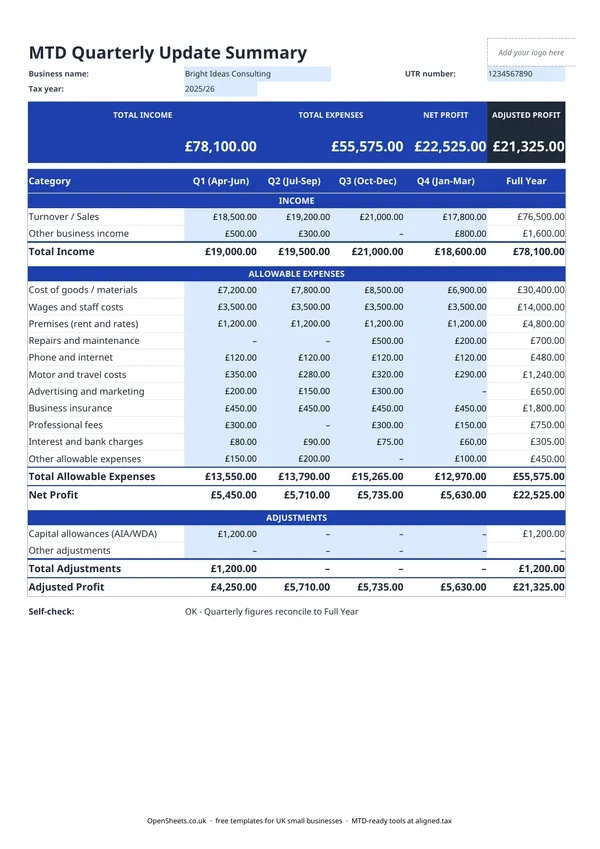
The layout follows HMRC’s own income and expense categories for self-employment, so what you track here maps directly to what you submit.
Income rows:
Turnover and sales is your main trading income, anything you have invoiced or received for goods or services. Other business income covers anything else that came in through the business but is not ordinary trading income, such as grants or insurance payouts.
Expense categories:
The template uses the standard HMRC self-employment expense headings. These are the same categories you would see in your Self Assessment return or your MTD software. Working through them row by row means nothing gets missed:
- Cost of goods and materials
- Wages and staff costs
- Premises (rent and rates)
- Repairs and maintenance
- Motor and travel costs
- Advertising and marketing
- Telephone, post, and internet
- Professional fees
- Interest and bank charges
- Other allowable expenses
Adjustments:
Below the main expenses section, there are rows for capital allowances and other adjustments. Capital allowances let you claim the cost of business equipment and vehicles over time. The adjustment rows bring these into the calculation so the Adjusted Profit figure at the bottom is the one you actually need for your quarterly update.
UK tax rules to know
Only allowable expenses count. Not every business cost is deductible. Personal costs are out. Costs with a mix of personal and business use can only be partially claimed. If you are unsure whether something qualifies, keep the receipt and check with HMRC guidance or an accountant. Vaguely claimed expenses attract more scrutiny than nothing.
Capital expenditure is not the same as an expense. If you buy a laptop, a van, or other equipment for the business, that is capital expenditure. You cannot simply deduct the full cost as an expense in the year you buy it (unless you use the Annual Investment Allowance, which lets you deduct qualifying purchases in full in the year). The capital allowances section of this template is where those deductions go.
Use the right tax year dates. The UK self-employment tax year runs from 6 April to 5 April the following year. The quarterly periods under MTD do not align perfectly with calendar quarters. Check the HMRC guidance for the exact quarterly update deadlines that apply to you, and note them somewhere visible so a filing date does not creep up on you.
Records must be digital. Once you are in MTD, your records need to be kept digitally. A well-maintained spreadsheet qualifies, as long as it feeds into MTD-compatible software for the actual submission.
Common mistakes to avoid
Mixing business and personal costs. If your phone, car, or home office has both personal and business use, only the business proportion is allowable. A common approach is to use a percentage based on actual use, and to keep a note of how you arrived at that figure.
Forgetting the adjustment section. It is easy to focus on income and expenses and overlook capital allowances. If you have bought equipment for the business, make sure the allowance shows up in the adjustments rows, otherwise your Adjusted Profit will be higher than it should be.
Not reconciling each quarter. The self-check at the bottom of the template confirms that your four quarterly columns add up to the Full Year total. If they do not, something has been entered in the wrong column. Catch it now rather than when you are about to submit.
Leaving the UTR blank. Your UTR is what connects this record to your HMRC account. Fill it in at the top and it will be there when you need it.
From this spreadsheet to filing with Aligned
If your combined income from self-employment and property is over £50,000, Making Tax Digital for Income Tax applies to you from April 2026. The threshold drops to £30,000 from April 2027 and £20,000 from April 2028.
Under MTD, you send HMRC a quarterly summary of income and expenses, rather than a single annual return. The figures in this template, income by type, expenses by HMRC category, adjustments, and Adjusted Profit, are exactly what a quarterly update requires. You are not preparing a separate report. You are keeping your records in the right shape so the update is already done when the filing date arrives.
Aligned (aligned.tax) is free MTD bridging software that sends your quarterly update to HMRC from the spreadsheet you already keep. It reads the figures directly from your records. You do not move your data into accounting software or retype anything. When your quarterly deadline comes around, Aligned connects to HMRC’s MTD system and submits on your behalf.
The income and expense categories in this template map to the categories Aligned submits to HMRC. Turnover feeds into your trading income total. Each expense row feeds into the matching HMRC category. The Adjusted Profit figure carries through to your quarterly update. Nothing needs to be recoded or reorganised. The path from this free spreadsheet to a submitted quarterly update is a straight line.