What accounts payable means for a small UK business
Accounts payable is the running total of what you owe to suppliers. Every time you receive an invoice from a supplier and have not yet paid it, it sits in your accounts payable until you settle it.
For a sole trader or small business, keeping tabs on this is mostly a cash flow job. You want to know what is coming out of your account over the next 30, 60, and 90 days, which invoices are already overdue, and which suppliers you need to prioritise. This tracker gives you that at a glance.
It is also the other side of invoicing. You use sales invoices to tell customers what they owe you. Supplier invoices are what you owe other businesses. Keeping both sides of the ledger tidy is the foundation of any half-decent set of books.
How the ageing columns work
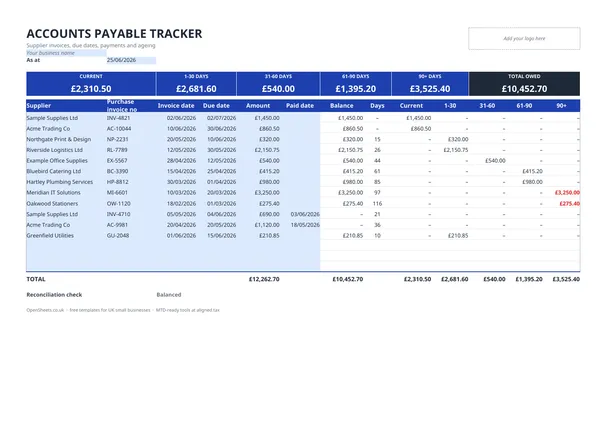
The ageing section is the most useful part of this tracker. Rather than one long list of unpaid invoices, it sorts your payables by how old they are.
Once you enter the invoice amount and due date, the 1 to 30, 31 to 60, 61 to 90, and 90-plus columns update automatically. Any invoice that is not yet overdue stays out of the ageing columns until it crosses its due date.
This matters for a few reasons. Most UK payment terms run at 30 days, so an invoice in the 31 to 60 column is already late. Anything in the 90-plus column needs a conversation with your supplier before it becomes a dispute. Checking the ageing columns once a week takes two minutes and keeps you on top of it.
What to include on each row
The tracker is built around the information on a standard UK supplier invoice.
Supplier name. Use the legal name or trading name you recognise them by. If you deal with the same supplier under different divisions or contacts, keep them consistent so the tracker stays clear.
Invoice date. The date the supplier issued the invoice. Enter it in dd/mm/yyyy format.
Invoice number. The reference number the supplier put on the invoice. This is what you quote if there is ever a query.
Due date. Most invoices state the payment terms (30 days, 14 days, end of month, and so on). Enter the actual due date, not the terms. The ageing columns need this to calculate correctly.
Amount. The total you owe, including VAT if your supplier charged it. If you are VAT-registered and want to reclaim the VAT, keep the original invoice on file as well.
Paid and Balance. Enter what you have paid in the Paid column. The Balance column shows what remains. Once the Balance hits zero, the invoice is settled.
Common mistakes when managing accounts payable
Not recording invoices promptly. Letting invoices pile up before you enter them means the ageing is wrong and you lose track of what is due. Entering each one when it arrives takes 30 seconds and saves a scramble later.
Confusing invoice date and due date. The invoice date is when the supplier issued it. The due date is when you have to pay. They are different, and the tracker needs both to work properly.
Paying from memory rather than the tracker. If you pay invoices without marking them off, the Balance column goes wrong and you lose the audit trail. Update the Paid column every time you make a payment.
Losing track of foreign currency invoices. If you pay any suppliers in euros or dollars, use the Currency column to flag those rows. The amounts in the tracker stay in the currency you entered, so keep that in mind when reading the totals row.
Missing invoices you have agreed to pay. If a supplier sends an invoice and you dispute part of it, do not skip entering it. Enter it in full and add a note. That way it stays on your radar until it is resolved.
Accounts payable, expenses, and your tax records
HMRC expects sole traders and small businesses to keep accurate records of their business expenses. Supplier invoices are part of that. Your accounts payable tracker, together with the actual invoices, is your evidence that an expense was incurred, that it was a business cost, and that you paid it.
The total paid column in this tracker is a useful cross-check at the end of your accounting period. Add up what you paid to suppliers during the year and compare it against your bank statements. The two should match. If they do not, something has been missed or duplicated.
Keeping clean payables records also makes your bookkeeping faster at year end. You are not searching through a year’s worth of bank transactions trying to remember what you bought and from whom. The tracker already has it.
Keeping digital records and Making Tax Digital
If your combined income from self-employment and property is over £50,000, Making Tax Digital for Income Tax applies to you from April 2026. The threshold drops to £30,000 from April 2027, and to £20,000 from April 2028.
Under MTD, you need to keep digital records of your business income and expenses and send HMRC a quarterly update rather than only filing once a year. A spreadsheet tracker like this one counts as a digital record. The key is that the numbers in it match what you would report to HMRC.
Aligned (aligned.tax) is free MTD bridging software built for sole traders and small landlords. It connects a spreadsheet you already keep to HMRC’s MTD system and sends your quarterly update without you having to move your records anywhere else. If you are already using this tracker to manage your payables and a separate bookkeeping sheet for your income and expenses, Aligned can work with both. You keep the spreadsheet habit you have built. Aligned handles the HMRC side.