What a budget vs actual spreadsheet does
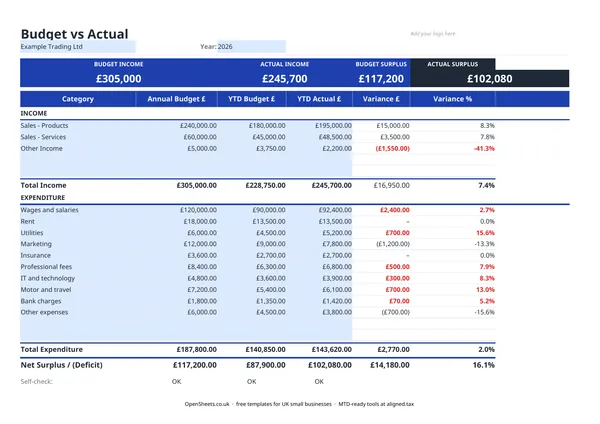
A budget vs actual template puts your planned figures next to what really happened. You enter your expected income and costs at the start of the year, then fill in the real numbers as the months go by. The template works out the variance for you: how much you are ahead or behind, and by what percentage.
For a UK sole trader or small business owner, it answers the questions that matter. Am I earning what I expected? Are my costs running over? Do I need to cut back somewhere, or can I invest?
Setting up the template
The sheet has two sections: Income at the top, Expenditure below. Each has columns for the Annual Budget, the YTD Budget (the share of the annual plan that should have been earned or spent so far), the YTD Actual (what really happened), and the Variance and Variance % columns that calculate on their own.
Start with your category names. For income, common choices for UK sole traders are sales from products, sales from services, and other income such as grants or interest. For expenditure, typical categories include wages and salaries, premises costs, utilities, insurance, IT and technology, travel and motor, professional fees, bank charges, and miscellaneous expenses. You do not have to use every row. Delete or relabel anything that does not apply.
Once your categories are set, enter your annual budget figures. These can come from last year’s accounts, a simple forecast, or an educated guess. A rough plan is better than none.
What the variance columns tell you
The Variance column subtracts your YTD Actual from your YTD Budget. A positive variance on income means you earned more than planned. A negative variance means you fell short. For expenditure the logic flips: positive means you spent less than budgeted, negative means you overspent.
The Variance % column turns that difference into a percentage of the budget. A 5% variance on a small category is less of a concern than a 5% variance on your biggest cost line. Use the percentages to decide where to look first.
The Net Surplus (Deficit) row at the bottom brings everything together: total income minus total expenditure, planned and actual. If the actual surplus is growing, your business is running ahead of plan. If the deficit is widening, something needs attention.
Common budgeting mistakes to avoid
Setting the budget and never looking at it again. A budget you never check is just a wish list. The comparison is the whole point. Build a habit of updating the actuals at least once a month.
Using last year’s figures without adjustment. Last year is a useful starting point, not a promise. If you won a new contract, lost a client, or your costs shifted, update the budget to reflect what you actually expect.
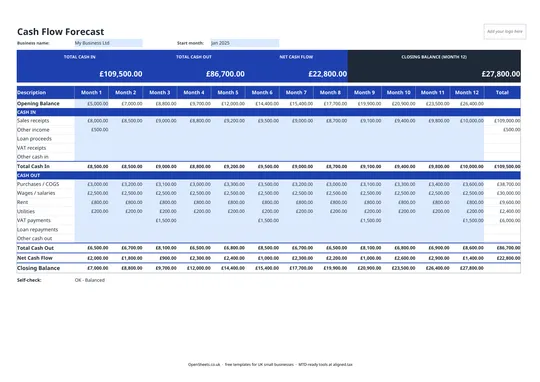
Mixing up cash flow and profit. This template tracks income earned and expenses incurred, not cash in and out of your bank account. If a client owes you money but has not paid yet, the income shows here but is not in your bank. A separate cash flow forecast covers that.
Putting everything in “Other expenses”. The more specific your categories, the more useful the variance analysis. If half your costs sit in a catch-all row, the template cannot tell you where the overspend is.
Keeping clean records for tax and MTD
The year-end totals in this template go straight into the figures you need for UK tax. Your YTD Actual income total is your gross turnover. Your YTD Actual expenditure total gives you your allowable expenses. Subtract one from the other and you have your taxable profit for Self Assessment.
If your combined income from self-employment and property is over £50,000, Making Tax Digital for Income Tax applies to you from April 2026. The threshold drops to £30,000 from April 2027 and £20,000 from April 2028. Under MTD, you keep digital records and send HMRC a quarterly summary of your income and expenses, rather than filing once a year. The categories you track in this budget vs actual template map closely to what MTD asks for, so keeping the sheet up to date through the year means your quarterly update is most of the way done.
When you are ready to send those quarterly updates, Aligned (aligned.tax) connects your spreadsheet directly to HMRC’s MTD system. It is free, and there is no need to move your data into separate accounting software. If you are already keeping a budget vs actual sheet, you have done most of the work.