Keeping track of rent across multiple properties
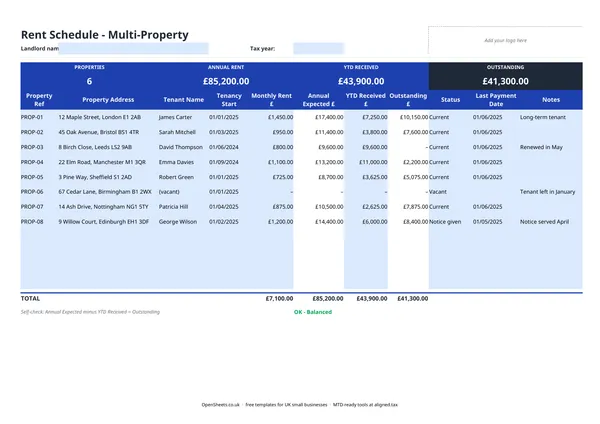
If you have more than one property, a single spreadsheet that shows every tenancy on one screen saves a lot of time. You can see at a glance what is owed, what has been paid, and which properties are vacant or in notice.
This template gives you one row per property. The columns cover the address, tenant name, tenancy start date, monthly rent, and a running total of rent received and outstanding for the year. The totals row at the bottom sums across all properties so you always know your overall rent roll.
What to record and why it matters
The fields in this template are not just useful day-to-day. They map directly to what HMRC wants to see.
Gross rent received. This is the total rent paid by tenants during the tax year, before any expenses. It goes in the UK property section of your Self Assessment return (or, under Making Tax Digital, into your quarterly income updates).
Allowable expenses. You can deduct certain costs from your rental income to arrive at your taxable profit. Keep a separate record of: letting agent fees, repairs and maintenance, landlord insurance, ground rent and service charges, and professional fees like accountancy. Note that mortgage interest is no longer a straight deduction for most landlords. It operates as a 20% tax credit instead. If you are unsure how this affects you, an accountant can run the numbers.
Tenancy dates. The start and end date of each tenancy affects when income falls into a tax year. Rent due but not yet received in one tax year can sometimes be allocated differently. Keep the dates accurate.
Common mistakes landlords make
Mixing up income and capital. Rent is income. Selling a property is a capital gain. The two are taxed differently. Make sure you are not accidentally including proceeds from a sale in your rental income figure.
Forgetting expenses you are entitled to. Repairs and replacements are deductible. Improvements are not (they reduce a future capital gains bill instead). The line can be blurry. When in doubt, keep the receipt and ask your accountant.
Not keeping records through the year. Trying to reconstruct a year’s worth of rent payments and expenses from bank statements in January is miserable. A few minutes each month updating this spreadsheet saves hours later.
Mixing personal and property finances. A separate bank account for your rental income and expenses makes the numbers much easier to track and reduces mistakes when it comes to Self Assessment.
Making Tax Digital for property landlords
If your combined income from self-employment and property is over £50,000, Making Tax Digital for Income Tax applies to you from April 2026. The threshold drops to £30,000 in April 2027 and £20,000 in April 2028.
Under MTD, you keep digital records of your property income and expenses and send HMRC a quarterly update (roughly every three months) instead of one annual return. The annual Self Assessment process is replaced by an end-of-year finalisation through your MTD software.
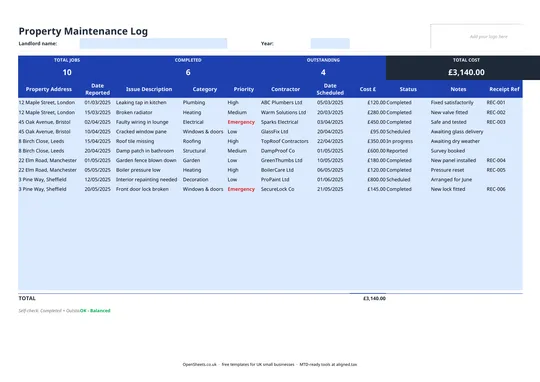
The quarterly update asks for the same information you already track in this spreadsheet: gross rental income, and expenses by category. HMRC’s expense categories for property include rent, rates and insurance; repairs and maintenance; finance costs; legal and professional fees; and other allowable property expenses. This template is structured so the totals you track here feed straight into those categories, with no rekeying.
When you are ready to send your quarterly updates, Aligned (aligned.tax) connects this spreadsheet directly to HMRC’s MTD system. You keep your records exactly as you do now. Aligned reads them and sends the update on your behalf. It is free, and there is no need to move your data into separate accounting software.
Landlords are exactly the people MTD was built for. Rental income is straightforward to track, and a well-kept rent schedule is most of the work already done. This template is the starting point. Aligned is what turns it into a quarterly filing.