Tracking Section 8 and Section 21 notices
Serving a possession notice is not something most landlords do often. When you do, the paperwork matters a great deal: dates, grounds, notice periods, and court deadlines all have to be right, and mistakes can mean starting the process again.
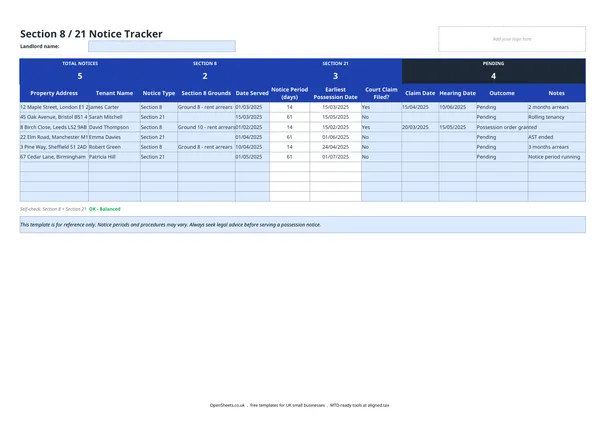
This tracker gives you one row per notice served. You can see at a glance which properties are in the notice period, which have gone to court, and which cases are still outstanding. The summary at the top counts your total notices, splits them by type, and shows how many are Pending.
It covers both Section 8 (fault-based, typically rent arrears) and Section 21 (no-fault) notices under the Housing Act 1988, so everything stays in one place regardless of which route you need to take.
Section 8 versus Section 21
The two routes exist for different situations.
Section 8 is used when the tenant has breached the tenancy agreement. The most common reason is rent arrears, though there are other grounds. You must cite the specific ground or grounds you are relying on when you serve the notice. The minimum notice period and the strength of your position at court depend on which grounds you use. Ground 8 (two months’ arrears at both the notice date and the hearing date) is mandatory, meaning the court must grant possession if you prove it. Other grounds give the court discretion.
Section 21 ends an assured shorthold tenancy without needing to prove a breach. It is often called a no-fault notice. You need to have met certain conditions before you can serve it validly: the deposit must be protected in a government-approved scheme, the tenant must have been given the prescribed information, an energy performance certificate and a gas safety certificate must have been provided, and the “How to Rent” guide must have been handed over. If any of those conditions have not been met, the Section 21 notice is invalid.
The rules around Section 21 have changed several times since 2015 and were under further review as of 2026. Always check the current position on gov.uk or with a solicitor before serving.
Getting the dates right
Getting the dates wrong is one of the most common reasons a possession notice fails.
Date Served. Record the exact date the notice was delivered. If you post it, allow for the postal service. Serving by first class post is treated as effective two working days after posting. Keep proof of postage.
Notice period. The minimum notice period varies by notice type and, for Section 8, by the grounds relied on. This template records the notice period you enter. It does not calculate it for you, because the correct period depends on factors a spreadsheet cannot know. Work this out before you complete the form, and record the figure you have calculated.
Earliest Possession Date. Once you enter the Date Served and the Notice Period (in days), the tracker calculates the earliest date on which you could apply to court for possession. You cannot issue proceedings before this date.
Court claim and hearing dates. If the tenant does not leave by the earliest possession date, you can apply to court. Enter the date you file the claim and the hearing date when it is confirmed. The tracker keeps both so you have a clear timeline if the case runs on.
Common mistakes to avoid
Serving a Section 21 before the conditions are met. A notice served before the deposit is protected, or before the prescribed documents have been handed over, is invalid. Check the conditions carefully before you serve.
Getting the grounds wrong on a Section 8. Citing the wrong ground, or a ground you cannot prove, weakens your case. If you are relying on rent arrears, make sure the amount is correct and that it meets the threshold for the ground you are using.
Miscalculating the notice period. If the notice period has not expired when you apply to court, the claim will be struck out and you will have to start again. Double-check your dates.
Not keeping proof of service. A tenant who disputes receipt of a notice can delay proceedings significantly. Keep a copy of every notice you serve, together with proof of how and when it was delivered.
Not getting legal advice. Possession proceedings are one area of landlord-tenant law where the cost of professional advice is almost always worth it. A solicitor or specialist letting agent can check that your notice is valid before you serve it, saving time and expense later.
Record-keeping, tax, and Aligned
A possession notice tracker is primarily a legal and property management tool, but it sits alongside the financial records you keep as a landlord.
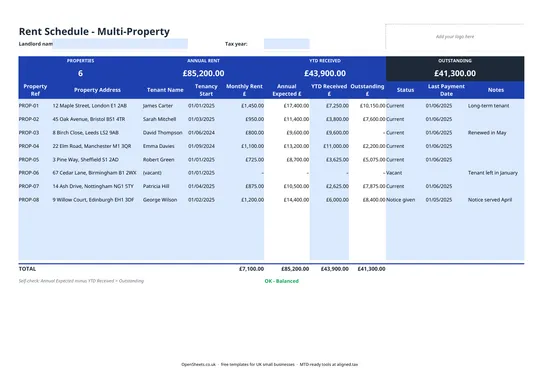
When a tenancy ends or a property becomes vacant as a result of a possession order, your rental income for that property stops. Recording the outcome date in this tracker alongside your rent schedule means your income records and your notice records stay consistent. That matters when you are reconciling your property income for Self Assessment, or when you are explaining a gap in rental receipts.
If your combined income from self-employment and property is over £50,000, Making Tax Digital for Income Tax has applied to you since April 2026. The threshold drops to £30,000 from April 2027 and £20,000 from April 2028. Under MTD, you send HMRC a quarterly summary of your property income and expenses using MTD-compatible software.
Keeping clean records across your properties, including a clear log of tenancies that ended and when, makes those quarterly updates much easier to put together. Aligned (aligned.tax) is free MTD bridging software that sends your income and expense records to HMRC straight from the spreadsheet you already keep. If you are tracking your rent schedule alongside this notice tracker, Aligned can handle the quarterly filing without you having to move your data anywhere.