What a statement of account is for
A statement of account is a summary you send to a customer. It lists every invoice you have raised, every payment they have made, and every credit note you have issued, with a running balance showing what they currently owe.
It is different from an invoice. An invoice is a request for payment for a specific job. A statement is a periodic summary of the whole account. You might raise an invoice on the day you complete work and then send a statement at the end of the month to show everything that is outstanding across several invoices.
Statements are particularly useful when a customer buys from you regularly, or when you have invoiced them more than once and payments are coming in at different times. Instead of chasing individual invoices, you send one document that shows the full picture.
Who sends statements of account in the UK
Any UK business that invoices customers regularly. That includes:
- Freelancers and contractors who work on retainer and invoice monthly
- Trades businesses with ongoing client relationships (electricians, plumbers, builders)
- Wholesalers and suppliers sending goods to trade customers
- Consultants with multiple active projects for the same client
If you deal with the same customers repeatedly and payment sometimes lags behind invoicing, a monthly statement keeps everything visible and gives the customer a clear reference point.
What goes on a UK statement of account
The template covers all the fields you need.
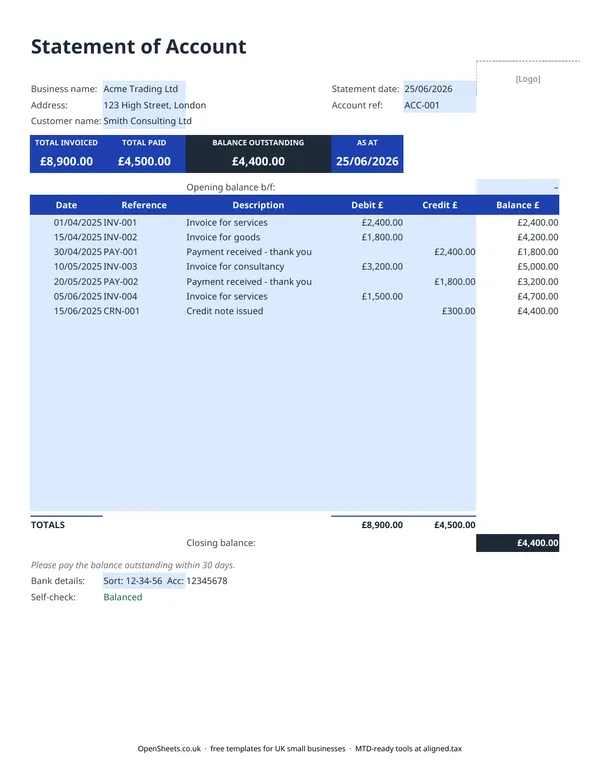
Business details. Your trading name and address at the top, so the customer knows immediately who it is from.
Customer name and account reference. A short account reference (for example ACC-001) ties the statement to your own records and makes it easy to track if the customer queries it.
Statement date and “As at” date. These tell the customer what period the statement covers. Use the same date for both unless you are producing a statement for a historical period.
Transaction table. One row per transaction, in date order. Each row has a date, a reference (your invoice or payment reference number), a description, and either a debit (invoices) or a credit (payments and credit notes). The running balance updates automatically.
Opening balance. If the customer had an amount outstanding before the period covered by this statement, enter it in the Opening balance b/f row. B/f stands for “brought forward” and is standard accounting shorthand.
Summary band. The Total Invoiced, Total Paid, and Balance Outstanding figures at the top are pulled from the table. They give the customer the headline before they read the detail.
Bank details. Your sort code and account number at the bottom, so the customer can pay immediately without having to dig out a previous invoice.
Common mistakes to avoid
Sending a statement without checking the running balance. If you have entered a transaction in the wrong column (a payment in the Debit column instead of the Credit column, for example), the balance will be wrong. Check the Self-check field before sending. The template will flag if the closing balance does not match.
Not including the account reference. Customers with multiple suppliers sometimes confuse statements. An account reference on every statement makes it easy to match to their own records.
Sending too infrequently. A statement at month end is one of the simplest habits that reduces late payment. Many customers will not chase their own outstanding invoices. A clear statement does it for you, without any awkwardness.
Mixing up invoices and credit notes in the wrong column. Invoices go in the Debit column (money owed to you). Payments and credit notes go in the Credit column (money received or cancelled). Getting this backwards will break your running balance.
Keeping records and staying organised
A clean statement of account is only possible if your underlying invoicing records are clean. Each reference on the statement should match an invoice or receipt you can pull up immediately.
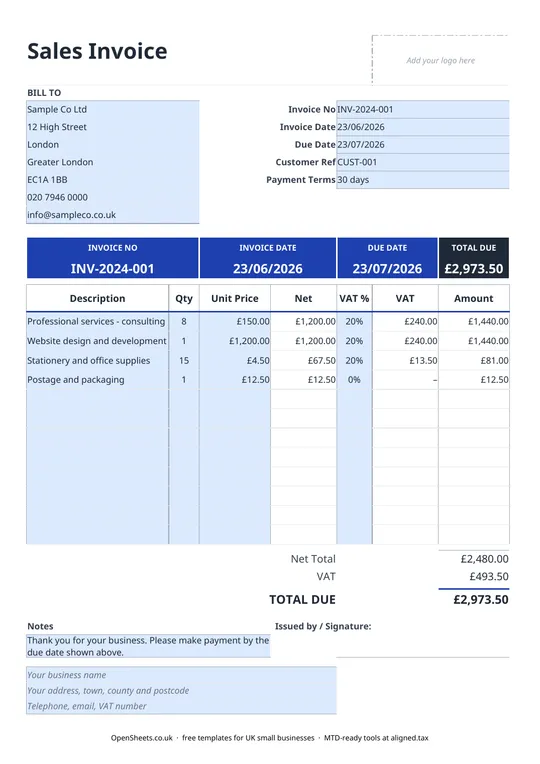
If you are keeping records in a spreadsheet, the OpenSheets library includes an invoice template and a bookkeeping tracker that work alongside this statement. Keeping them in the same folder means you always have the detail behind the summary.
If your combined income from self-employment and property is over £50,000, Making Tax Digital for Income Tax applies to you from April 2026. It means keeping digital records and sending HMRC a quarterly summary of your income and expenses. The threshold drops to £30,000 from April 2027 and £20,000 from April 2028.
When that time comes, Aligned (aligned.tax) is free MTD bridging software that sends your records to HMRC from the spreadsheet you already keep. Worth knowing about, when you are ready.