What a profit and loss statement does
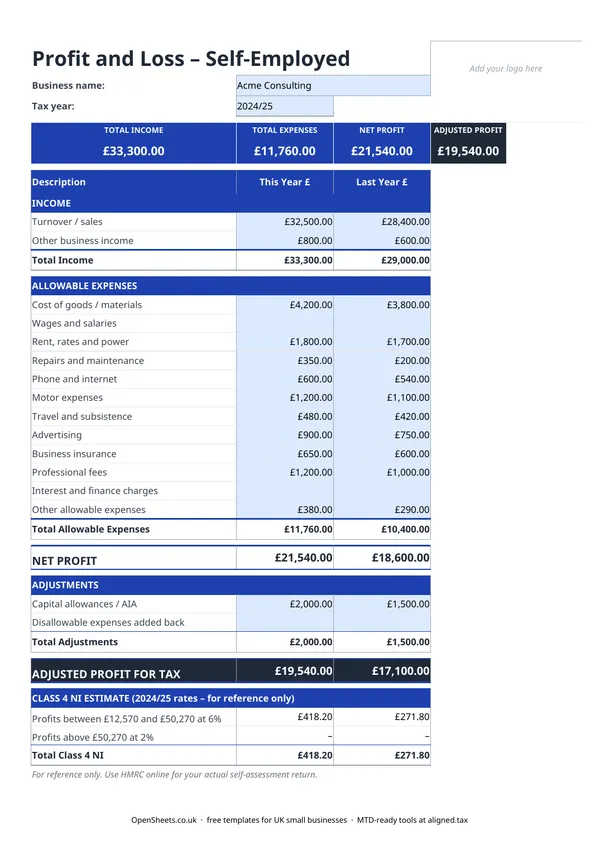
A profit and loss statement (sometimes called a P&L or an income statement) is a summary of what your business earned and what it cost to run over a set period. For self-employed people in the UK, that period is the tax year: 6 April to 5 April.
Three things go into it. Income is everything your business received. Allowable expenses are the costs HMRC lets you deduct. The difference is your profit, and profit is what you are taxed on.
This template goes one step further than a basic P&L. It adds an adjustments section for capital allowances (which reduce your taxable profit) and disallowable expenses (costs you actually paid but HMRC will not allow as a deduction, which are added back). The result is your adjusted profit for tax: the figure that goes on your Self Assessment return.
Who this template is for
Any sole trader or self-employed person who completes a Self Assessment tax return. It does not matter whether you are a freelancer, a tradesperson, a consultant, or a market trader. If you trade under your own name or as a sole trader and you need a clear record of your profit for the year, this is the one to use.
It covers a single tax year and shows the previous year alongside so you can spot trends without opening a second file.
UK rules that matter
Allowable expenses must be wholly and exclusively for the business. That phrase comes straight from HMRC. If you use your car for both business and personal journeys, you can claim only the business proportion. Same with your phone. The motor expenses and phone and internet rows in this template are the ones most likely to need splitting before you enter them.
Capital allowances replace a straight depreciation deduction. You cannot deduct the full cost of buying equipment as an expense in the year you buy it. Instead, HMRC gives you a capital allowance. The most common one is the Annual Investment Allowance (AIA), which lets most sole traders deduct the full cost of qualifying plant and machinery in the year of purchase, up to the AIA limit. That deduction goes in the Adjustments section of this template, not in the expense rows.
Disallowable expenses need adding back. Some costs are real and legitimate business spending, but HMRC will not let you deduct them from trading profit. Client entertaining is the most common one. If you included those costs in your expense rows to get an honest picture of what you spent, make sure the disallowable portion is added back in the Adjustments section, or your taxable profit will be too low.
Losses can be carried forward. If your adjusted profit for tax is negative, you made a trading loss. You can usually carry it forward and set it against profits from the same trade in future years. The mechanics sit outside a P&L spreadsheet, but your accountant will need to see the loss figure clearly stated.
Common mistakes to avoid
Using turnover instead of profit on your tax return. Turnover is what your business received. Profit is what is left after expenses. HMRC taxes your profit. If you file the wrong number you will either overpay or underpay tax, and neither is a good outcome.
Forgetting to claim capital allowances. If you bought a significant piece of equipment during the year, the AIA deduction can cut your tax bill noticeably. It does not appear automatically. You need to work out the allowance and enter it in the Adjustments section.
Including disallowable expenses without adding them back. Tracking everything you actually spent is sensible. Just make sure the disallowable portion is added back in Adjustments before you read off the taxable profit figure.
Mixing up cash and accruals accounting. HMRC allows most self-employed people to use cash basis accounting, where you record income when you receive it and expenses when you pay them. Some people use accruals basis instead, recording income and expenses when they arise even if the money has not moved yet. The two can give different profit figures for the same year. Pick one and apply it consistently. If you are not sure which to use, cash basis is simpler and is the HMRC default for most sole traders.
Not keeping the underlying records. A P&L spreadsheet is a summary. HMRC can ask to see the invoices, receipts, and bank statements behind every figure. Keep those records for at least five years after the Self Assessment filing deadline for the relevant tax year.
From this spreadsheet to filing with HMRC
Keep your P&L up to date through the year and Self Assessment becomes much less of a scramble. The adjusted profit figure goes straight into the self-employment pages of your return. No sifting through a year’s worth of bank statements in January.
If your combined income from self-employment and property is over £50,000, Making Tax Digital for Income Tax already applies to you from April 2026. The threshold drops to £30,000 in April 2027 and £20,000 in April 2028.
Under MTD, you send HMRC a quarterly summary of your income and expenses rather than one annual return. The categories HMRC asks for in those quarterly updates map directly to the rows in this template. Turnover sits in the income section. Each expense category (cost of goods, wages, rent and rates, phone, motor, travel, advertising, insurance, professional fees, finance charges) has a direct equivalent in the HMRC reporting structure. You are not rekeying data into a new system. You are sending what you already track.
When you are ready for that step, Aligned (aligned.tax) is free MTD bridging software that connects this spreadsheet directly to HMRC’s MTD system. You keep your records exactly as you do now. Aligned reads them and sends the quarterly update on your behalf. No separate accounting software needed, and nothing about how you work has to change.
A clean profit and loss statement is the foundation of good sole trader bookkeeping. It is what your accountant needs, what a lender might ask for, and now what HMRC will expect to see every quarter. This template gives you that in one sheet, free to download, with no sign-up required.