What a quote is and when to use one
A quote is a written offer to carry out a specific piece of work at a fixed price. Once a customer accepts it, you are both bound to those terms. That is different from an estimate, which is an informed approximation that can change as the work develops.
Use a quote when you can price the job accurately before starting. Use an estimate when the scope is genuinely uncertain.
Both freelancers and established businesses send quotes. In some trades the word “quotation” is preferred; in others “estimate” is more common, even when the price is fixed. The heading on this template can be changed to suit your trade. What matters is that the document makes the price, scope, and terms clear.
What to include on a UK quote
There is no single legal format for a quote, but covering these fields protects both sides.
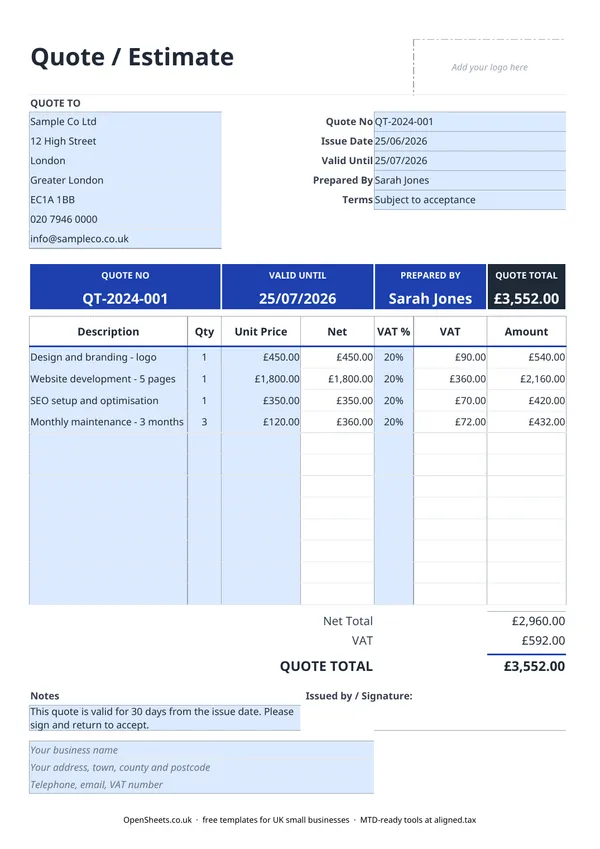
Your business details: trading name, address, phone, and email. If you are a limited company, you are legally required to show your company name and registered number on commercial documents. Sole traders should at least include their trading name and a way to be contacted.
The customer’s name and address, a unique quote number, and the date it was issued. A Valid Until date is important. Without one, a customer could come back six months later and hold you to a price that no longer makes commercial sense.
A clear description of the work or goods, the quantity, and the unit price. Vague line items cause disputes. “Website development” is better as “Website development, 5 pages, as per specification agreed 14/06/2026.”
Payment terms. Will you invoice on completion, in stages, or upfront? State this on the quote so there are no surprises later.
VAT on quotes
If you are VAT-registered, a quote should show the net price, the VAT rate for each line, the VAT amount, and the total including VAT. Your customer needs to see both the net and the gross figures. If they are VAT-registered themselves, they will want the net figure to reclaim the input tax.
Common VAT rates to know:
- 20% is the standard rate. Most goods and services fall here.
- 5% is the reduced rate. It applies to things like domestic energy.
- 0% covers zero-rated goods and services, such as most food and children’s clothing.
If you are not VAT-registered, leave the VAT columns blank. Do not show a VAT figure on your quote if you are not registered, even if the customer asks.
If you are unsure whether your service is standard-rated, reduced, zero-rated, or exempt, check with HMRC or your accountant before sending the quote. Getting it wrong on a quote is easier to fix than getting it wrong on an invoice, but still worth avoiding.
Common mistakes to avoid
No expiry date. A quote with no Valid Until date is an open-ended commitment. Always include one.
Vague scope. “Building work” tells the customer almost nothing. Be specific about exactly what the price covers. Anything not listed is not included.
Forgetting exclusions. If travel, materials, or disposal costs are not in the price, say so explicitly. Disputes usually start with something the customer assumed was included.
Sending it without keeping a copy. Keep a record of every quote you issue, whether it is accepted, rejected, or ignored. If a job is disputed later, the quote is your first piece of evidence.
Not following up. Most customers who do not respond quickly are not gone, they are busy. A polite follow-up a week before the Valid Until date converts more quotes than you might expect.
Staying organised as the quotes add up
Once you are sending quotes regularly, keeping track of what has been accepted, declined, or is still pending becomes its own job. A simple sales pipeline or bookkeeping tracker (there are both in the OpenSheets library) can handle that without adding much overhead.
If your combined income from self-employment and property is over £50,000, Making Tax Digital for Income Tax applies to you from April 2026. It means keeping digital records and sending HMRC a quarterly summary of your income and expenses, rather than only filing once a year. The threshold drops to £30,000 from April 2027 and £20,000 from April 2028.
If you are approaching that point and want a simple way to handle the quarterly filing from a spreadsheet you already keep, Aligned (aligned.tax) is worth a look. It is free MTD bridging software that sends your records to HMRC without you needing to move to separate accounting software.