What a tenant deposit tracker does
Every landlord who takes a deposit is legally required to protect it in a government-approved scheme and give the tenant their prescribed information within a set number of days. Knowing which scheme holds each deposit, what the reference number is, whether the deadline was met, and what happened when the tenancy ended is not optional. It is the sort of thing that causes real trouble if you try to reconstruct it from memory six months later.
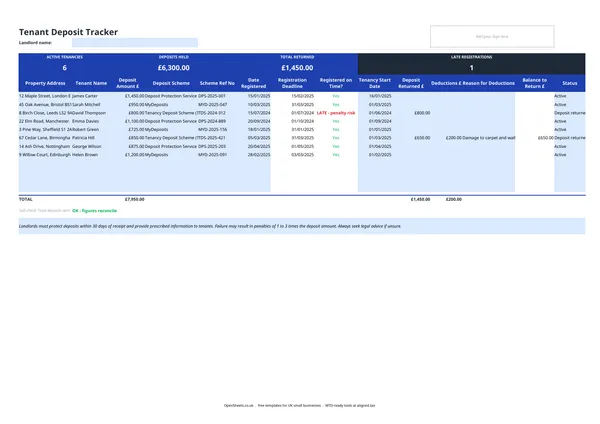
This template gives you one row per tenancy. The summary tiles at the top update automatically, so you can see at a glance how many deposits you are holding, the total value, how much has been returned, and whether anything is overdue.
Deposit protection: what the law requires
UK landlords letting on an assured shorthold tenancy (AST) must protect any deposit in one of the three government-authorised schemes and hand over the prescribed information to the tenant within the required number of days. The template flags missed deadlines so they are hard to overlook.
Two types of scheme exist. Custodial schemes hold the deposit money during the tenancy. Insurance-based schemes let you keep the deposit but require a fee to the scheme, which then backs any claims. Both types follow the same registration rules. The scheme you used goes in the Deposit Scheme column; your reference number goes in Scheme Ref No.
For the definitive current rules on timing, prescribed information, and what happens if you miss the deadline, check gov.uk or speak to a property solicitor. The rules have changed more than once and the consequences of getting them wrong can be costly.
What to record when a tenancy ends
When a tenancy ends, the Deposit Returned and Deductions columns let you record the full picture. Enter the amount you are returning, any amount you are deducting, and a brief reason for each deduction.
A clear deduction record matters for two reasons. If the tenant disputes an amount through the scheme’s adjudication service, you will need to show what you withheld and why. And any deductions you keep that relate to rent arrears may be income for tax purposes, so you want the figures written down clearly.
Keep receipts and photographs to back up your deduction records. A note in the spreadsheet is not enough on its own, but it is the record that keeps you organised and makes everything else easier to find.
Common mistakes landlords make with deposits
Missing the registration deadline. The clock starts the day you receive the deposit, not the day the tenancy begins. The template works out the deadline and flags it. You still need to act on the warning.
Using a scheme that has lapsed. If your insurance-based scheme membership lapses or the premium goes unpaid, the protection may fail. Log your reference number here and check your renewal dates separately.
Vague deduction reasons. “General damage” will not hold up if a tenant challenges a deduction. Be specific: “Carpet in main bedroom stained beyond fair wear and tear, replacement cost £X.” The Reason for Deductions column is a prompt to get that detail down at the time.
Treating the deposit as your own money. The deposit belongs to the tenant until the tenancy ends and any claim is agreed. Keep it out of your rental income account. A separate account makes the accounting clean and avoids any confusion at tax time.
Slow returns after the tenancy ends. Once you and the tenant have agreed the figures, return the balance promptly and record the date in the template. Delays without communication are the usual trigger for disputes.
Making Tax Digital for property landlords
Deposits are not rental income. They are a liability you hold and must account for when the tenancy ends. What counts towards your tax return, and towards Making Tax Digital, is the rent you actually received and the expenses you can set against it.
If your combined income from self-employment and property is over £50,000, Making Tax Digital for Income Tax applies to you from April 2026. The threshold drops to £30,000 in April 2027 and £20,000 in April 2028. Under MTD, you keep digital records of your property income and expenses and send HMRC a quarterly update through MTD-compatible software.
The records that feed those quarterly updates are your rental income, your allowable expenses, and the dates and amounts for each. A deposit tracker sits alongside those records and keeps your liabilities separate, so your income figures stay clean.
HMRC’s expense categories for property income include rent, rates and insurance; repairs and maintenance; finance costs; legal and professional fees; and other allowable property expenses. Deductions you make from a deposit for repairs or replacements map to the repairs and maintenance category. Keeping that detail in this tracker means you have the figures ready when you put together your quarterly update, with nothing to dig back through.
When you are ready to send your quarterly updates, Aligned (aligned.tax) connects your spreadsheet records directly to HMRC’s MTD system. You keep your records exactly as you do now. Aligned reads them and sends the update on your behalf. It is free, and there is no need to move your data into separate accounting software.
Most landlords who already use a deposit tracker are ahead of where they need to be for MTD. The hard part is building the habit of recording income and costs as they happen. If you are already updating this spreadsheet each time a tenancy starts or ends, adding a rent schedule and an expenses log is a short step. Aligned takes it from there.