What this calculator does
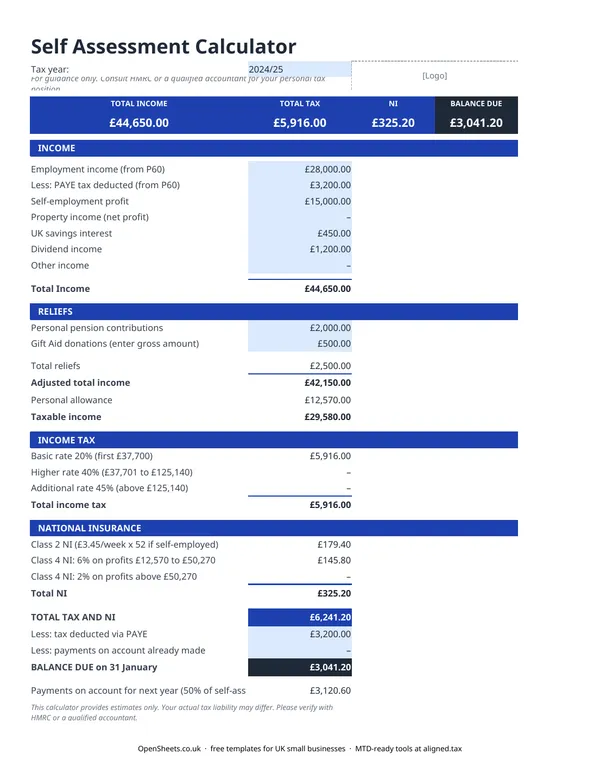
Self Assessment can feel like a guessing game until you sit down to file. This calculator takes away that uncertainty. Enter your income sources and reliefs, and it shows you your estimated income tax and National Insurance bill for the year, including how much you still owe after any PAYE already deducted.
It covers the income types that come up most often for UK sole traders and landlords: employment income, self-employment profit, savings interest, and dividends. You can use it partway through the year to forecast what to set aside, or at the end of the year to check your figures before filing.
The income types it covers
Employment income. If you were employed at any point during the year, enter your gross pay and the PAYE tax and NI already deducted. The calculator accounts for these so your balance due reflects only what is left to pay.
Self-employment profit. Enter your net profit after allowable expenses. If you have not totalled your expenses yet, the income tracker in the OpenSheets library can help.
Savings interest. Interest from bank accounts and savings counts as income for tax purposes. The calculator adds it to your total and applies the personal savings allowance, which means the first slice of interest is tax-free for most people (the exact amount depends on whether you are a basic or higher-rate taxpayer, so check the current allowance on gov.uk).
Dividend income. If you receive dividends from company shares, enter the total here. Dividends are taxed differently from other income, and the calculator applies the dividend tax rates to the correct portion of your income.
Reliefs that reduce your bill
Personal pension contributions. Payments into a private pension attract tax relief. The calculator adjusts your taxable income when you enter these contributions.
Gift Aid donations. Charitable donations made through Gift Aid extend your basic-rate band, which can reduce the tax on your other income if you are a higher-rate taxpayer. Enter the amount you donated and the calculator factors it in.
Personal allowance. Everyone gets a personal allowance: the amount of income you can earn before paying any income tax. The calculator applies the standard allowance automatically. If your income is over £100,000, the allowance tapers away, and this calculator does not handle that edge case. Speak to an accountant if you are in that range.
How income tax bands work
UK income tax is not a flat rate. You pay different percentages on different slices of your income:
- The basic rate applies to income above your personal allowance, up to the higher-rate threshold.
- The higher rate applies to income above that threshold, up to the additional-rate threshold.
- The additional rate applies to income above the top threshold.
The exact thresholds can vary by tax year. The calculator shows how your income falls across each band and the tax on each slice, so you can see exactly where your bill comes from.
National Insurance for the self-employed
If you are self-employed, you pay two types of National Insurance on your profits:
- Class 2 is a flat weekly amount, charged once your profits exceed the small profits threshold.
- Class 4 is a percentage of profits, split across two rates depending on how much you earn.
The rates and thresholds change from time to time. For the current figures, check gov.uk or the HMRC guidance for self-employed National Insurance. The calculator applies the rates for the tax year you select.
Common mistakes when estimating your tax
Forgetting to account for PAYE. If you had employment income during the year, your employer already paid some tax and NI on your behalf. Not entering these figures will make your estimated bill look too high. The calculator has separate fields for PAYE tax deducted and employee NI already paid so the balance due is accurate.
Using turnover instead of profit. For self-employment income, the calculator needs your profit after allowable expenses, not your gross turnover. If you enter your turnover, the estimate will be too high.
Missing the payment on account. Self Assessment is not just one payment in January. If your bill is above a certain level, HMRC asks for two payments on account toward next year’s tax as well. This calculator shows your current year liability. Your HMRC account will show the full amount due in January if payments on account apply.
Leaving out savings interest. Banks do not always deduct tax at source, but that does not mean the income is tax-free. Interest from savings is taxable income and needs to go on your return.
Setting money aside through the year
One of the most useful things you can do with this calculator is run it mid-year. Enter your income and expenses to date, scale them up to a full-year estimate, and you will know roughly what to set aside. Many sole traders aim to put 20 to 30 per cent of their self-employment income into a separate savings pot for tax. The right amount depends on your total income and the rate bands you fall into.
Self Assessment, digital records, and MTD
Good records make Self Assessment much less stressful, and they are exactly what Making Tax Digital for Income Tax will require when it applies to you.
If your combined income from self-employment and property is over £50,000, Making Tax Digital for Income Tax already applies from April 2026. The threshold drops to £30,000 from April 2027 and £20,000 from April 2028.
Under MTD, you keep digital records of your income and expenses and send HMRC a quarterly summary rather than one annual return. The income categories you enter into this calculator map directly to the categories HMRC asks for in those quarterly updates: self-employment income, property income, and other income (savings, dividends) are all separate lines in the MTD submission, just as they are in this spreadsheet.
If you are already tracking your income and expenses carefully in a spreadsheet, moving to MTD is a smaller step than it sounds. The spreadsheet you already use can become the source of your quarterly updates without rebuilding your records in new software.
Aligned (aligned.tax) is free bridging software that connects a spreadsheet like this one directly to HMRC’s MTD system. You carry on keeping your records exactly as you do now. Aligned reads the figures and sends the quarterly update on your behalf. The income and relief categories in this calculator align with the HMRC income types Aligned submits, so the figures flow through with no rekeying. When you are ready to move from estimating to actually filing, Aligned is the next step.