What a balance sheet shows
A balance sheet gives you a point-in-time view of your business finances. On one side you have everything the business owns (assets). On the other, everything it owes (liabilities) and the owners’ stake in what is left over (equity). The two sides must always balance.
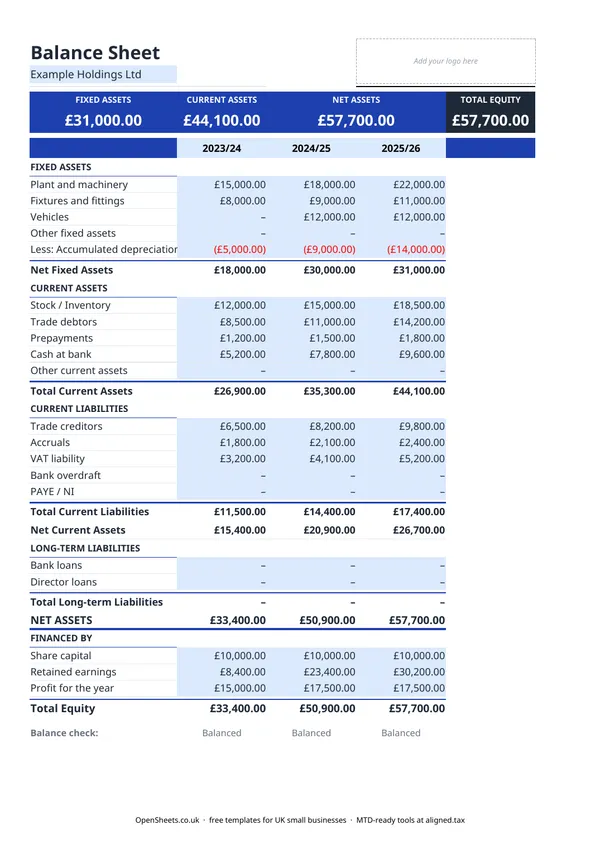
This template covers three financial years side by side, so you can see how your position has changed over time at a glance. That is useful when you are reviewing the business with an accountant, applying for a loan, or preparing year-end accounts.
The sections explained
Fixed assets are things the business owns and uses for more than one year. Machinery, vehicles, fixtures, and fittings all go here. Each year you own an asset, its value reduces through depreciation. The template has a Less: Accumulated Depreciation row so you can show the original cost and the written-down value separately, which is standard UK accounting practice.
Current assets are things that will turn into cash within the year. Stock you plan to sell, money your customers owe you (trade debtors), and cash in the bank all sit here.
Current liabilities are amounts you owe that fall due within the next twelve months. Trade creditors (suppliers you owe), accruals, VAT you have collected but not yet paid to HMRC, and any bank overdraft go in this section.
Long-term liabilities are amounts owed beyond twelve months. Bank loans and director loans are the most common examples for a small business.
Net assets is what you get when you subtract total liabilities from total assets. It must equal the equity section below.
Financed by shows where the equity comes from. For a limited company this is typically share capital plus retained earnings plus the current year profit. For a sole trader it reflects the owner’s accumulated investment and drawings.
The balance check at the bottom confirms the sheet balances. A healthy balance sheet always reads Balanced. If it does not, a figure is in the wrong place.
UK accounting conventions to follow
Use the same date for all figures in a single column. A balance sheet is prepared “as at” a specific date, not over a period. The standard for UK businesses is to prepare it as at the last day of the accounting year, for example 31 March or 5 April for the tax year, or 31 December for a calendar-year business.
Assets and liabilities are shown at their book value, not their market value. If a property or piece of equipment is worth more on the open market than it shows on the balance sheet, that is expected and normal. The balance sheet uses the cost you paid, less accumulated depreciation.
If your business is VAT-registered, the VAT Liability row should show the net amount owed to HMRC at the balance sheet date, which is the amount on your most recent VAT return that has not yet been paid. Do not include VAT in your trade debtor or trade creditor figures; show those net of VAT.
Common mistakes
Mixing up the year columns. Enter each year’s figures in the correct column. The Balance Check will catch a mismatch, but it is faster to be careful from the start.
Netting assets against liabilities. List assets and liabilities separately. A bank account in credit is a current asset. An overdraft on the same account is a current liability. Do not net them against each other.
Putting depreciation in the wrong place. Depreciation reduces the value of a fixed asset over time. The correct place for it is the Less: Accumulated Depreciation row in the Fixed Assets section, not as an expense in this sheet (expenses go on your profit and loss account, which is a separate document).
Treating drawings as a business expense. If you are a sole trader and you take money out of the business for personal use, that is a drawing, not a wage expense. Drawings reduce your equity (retained earnings), not your profit.
Director loans in the wrong direction. If the company owes a director money, it is a long-term liability. If a director owes the company money, it is a current asset (a debtor). Get the direction right or the sheet will not balance.
Keeping clean records for tax and MTD
The figures on your balance sheet come directly from the records you keep through the year. A bookkeeping spreadsheet tracking income and expenses is what feeds the profit figure, and trade debtors and creditors come from keeping your invoices and bills up to date.
If your combined income from self-employment and property is over £50,000, Making Tax Digital for Income Tax applies to you from April 2026. The threshold drops to £30,000 in April 2027 and £20,000 in April 2028. Under MTD you keep digital records and send HMRC a quarterly summary of your income and expenses, rather than only filing once a year.
Good, up-to-date bookkeeping makes that quarterly summary straightforward. It also means your balance sheet figures are ready when you or your accountant need them, without reconstructing the year from bank statements.
Aligned (aligned.tax) is free MTD bridging software that sends your records to HMRC straight from the spreadsheet you already keep. If you are working toward MTD compliance, it is worth a look. No separate accounting software is needed.