What a CIS deduction statement is for
If you are a contractor in the UK construction industry, you are required to register under the Construction Industry Scheme and deduct tax from payments you make to subcontractors. That deduction goes to HMRC as an advance against the subcontractor’s tax and National Insurance bill.
The deduction statement is the record of that transaction. It tells the subcontractor exactly what you paid, what you deducted, and why. Without it they cannot reconcile their own records or reclaim any overpayment at the end of the year.
HMRC requires contractors to issue a statement for every payment made to a subcontractor. This template covers all the fields you need.
Who this template is for
Contractors in the construction sector who make payments to subcontractors under CIS. You need to be registered as a contractor with HMRC before you start making deductions. If you have not registered, the HMRC website has a straightforward online process.
This template is not aimed at the subcontractor receiving the payment. Subcontractors get a copy of the statement. Their own record-keeping is about logging what they received, not generating the statement itself.
How CIS deductions are calculated
CIS deductions are applied only to the labour element of a payment, not to materials. If your subcontractor invoices you for £10,000 of which £2,500 is materials and £7,500 is labour, you deduct at the applicable rate on the £7,500 only.
The standard deduction rates are:
- 20% for verified subcontractors registered with HMRC under CIS.
- 30% for subcontractors you cannot verify or who are not registered.
- 0% for subcontractors who hold gross payment status, meaning HMRC has authorised you to pay them the full amount without deducting anything.
You find out which rate applies by verifying the subcontractor with HMRC before making the first payment. The template has a CIS Rate field where you enter the rate. Everything else calculates from there.
For the exact current rates and the verification process, check gov.uk or speak to your accountant. The rates above have been stable for many years but HMRC can change them.
What goes on the statement
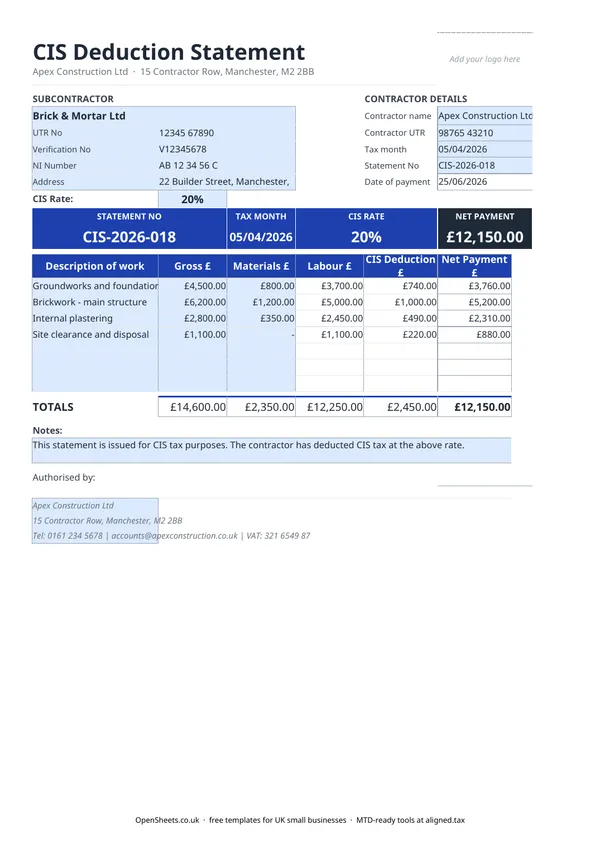
HMRC sets out what a CIS deduction statement must contain. This template covers all of it:
- The contractor’s name and address.
- The subcontractor’s name, Unique Taxpayer Reference (UTR), and National Insurance number.
- The subcontractor’s verification number (the reference HMRC gives you when you verify them).
- The tax month in which the payment was made.
- The gross amount paid, before any deduction.
- The cost of any materials included in the payment.
- The amount of the CIS deduction.
- The net amount actually paid to the subcontractor.
The template uses a line-item table so you can record several payments on one statement if you are issuing it for a tax month that covered multiple jobs or payments. The totals row sums each column automatically.
When to issue it
The statement must reach the subcontractor within 14 days of the end of the CIS tax month in which the payment was made. The CIS tax month runs from the 6th of one month to the 5th of the next, in line with the UK tax year.
For example, if you made a payment on 20 March, the tax month runs to 5 April, and the statement is due by 19 April.
Issuing statements late is a common mistake and can attract a penalty. Building the statement into your payment process rather than treating it as an afterthought saves you the headache.
Common mistakes contractors make
Not verifying the subcontractor first. If you pay without verifying and HMRC later finds the subcontractor is unregistered, you may be liable for the difference between the 20% you deducted and the 30% that should have applied.
Applying CIS to the full invoice amount. The deduction is on labour only. If your subcontractor includes materials and you deduct on the whole amount, you are over-deducting, which causes problems for both of you.
Missing the 14-day deadline. The statement must be with your subcontractor within 14 days of the tax month end, not within 14 days of the payment date. The two are different if the payment falls early in the month.
Using the wrong UTR or verification number. Double-check both against the details HMRC returned when you verified. A mismatch can cause trouble when your subcontractor tries to offset the deductions against their tax bill.
Not keeping your own copy. You need the statement for your own CIS monthly return to HMRC and for any future enquiry. Keep a copy in your records alongside the subcontractor’s invoice.
Keeping your records clean for the year ahead
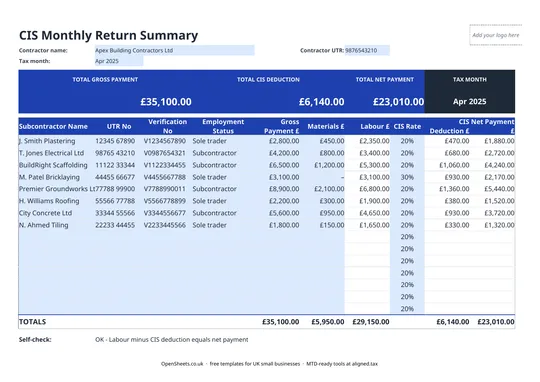
Your CIS statements feed directly into your monthly CIS return to HMRC, which requires you to report each subcontractor, the gross amount paid, and the deduction made. They are also your evidence if a subcontractor disputes the figures or HMRC queries a return. Keeping them in order is not optional, and doing it as you go is much easier than trying to reconstruct a year’s worth in January.
If you run a construction business as a sole trader or as the director of a small limited company, your CIS records sit alongside your broader income and expense records. Keeping both sets of records in one place makes the year-end picture easier to build.
If your combined income from self-employment and property is over £50,000, Making Tax Digital for Income Tax applies to you from April 2026. The threshold drops to £30,000 from April 2027 and £20,000 from April 2028. MTD means keeping digital records of your business income and expenses and sending HMRC a quarterly summary, rather than one annual return.
Aligned (aligned.tax) is free MTD bridging software that connects your existing spreadsheet records to HMRC. If you are already tracking your construction income and expenses in a spreadsheet, Aligned can send your quarterly updates from the same file, with no need to move everything into a separate accounting system.