What a daily takings sheet is and who uses it
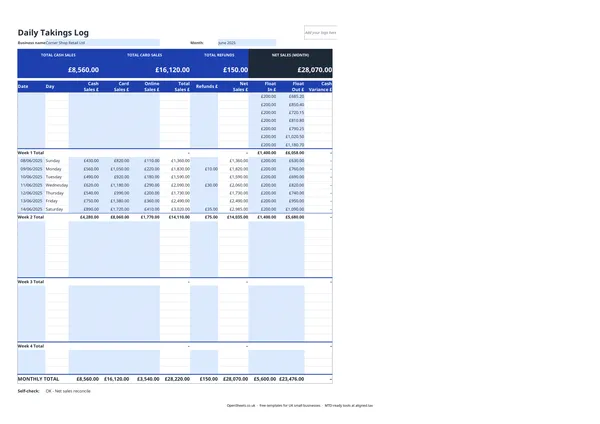
A daily takings sheet is a record of everything a business takes in on a given trading day, broken down by how the money arrived: cash, card, or online payment.
Retail shops, cafes, restaurants, market stalls, hairdressers, and any other business that takes payments across the day use a daily takings sheet to close off each trading day cleanly. It tells you what you sold, what came in, whether the till balances, and where to look if it does not.
This template covers a full calendar month. Each day gets its own row. Weekly subtotals let you spot patterns early. The monthly total gives you a clean revenue figure for the period you can actually rely on.
What the columns track
The sheet splits your daily income into three payment channels.
Cash Sales covers any payment taken in physical notes and coins. Card and online payments go in their own columns so you can reconcile each channel against its own report at the end of the month.
Card Sales is the total taken through your card terminal. At the end of the month, this should match the gross settlement total your card processor reports.
Online Sales covers any sales taken through a website, app, or marketplace that settle separately into your bank account.
Refunds is where you record any money returned to customers that day. The Net Sales column deducts refunds from your total automatically, giving you a clean revenue figure.
Float In and Float Out let you record the cash float at the start and end of the day. The Cash Variance column shows whether the till balances. If it does not, you have a clear starting point for working out why.
Reconciling your till at the end of the day
The cash variance column is your daily till reconciliation. Here is how it works.
At the end of trading, count the cash in the till. Enter that figure in Float Out. The template compares it to Float In plus the day’s cash sales, and shows the difference.
A small variance (a few pence either way) is common. Card transactions occasionally get entered as cash by mistake, or a coin falls behind the drawer. A consistent variance, or a large one, usually points to one of three things: a recording error (a sale entered in the wrong column), a customer given the wrong change, or a training issue if more than one person uses the till.
Catching this daily keeps small problems small.
Keeping your monthly totals clean
At the end of each month, the Monthly Total row gives you four figures: total cash sales, total card sales, total refunds, and net sales for the month.
Net sales is the number that feeds into your business records. It should match the sum of your bank deposits plus your net cash takings for the month. If it does not, work back through the weekly totals to find where the gap is.
This monthly net sales figure is also the one that goes into your bookkeeping records as your trading income for the period.
Common mistakes to avoid
Not recording refunds on the day they happen. Refunds recorded the next day (or not at all) create a mismatch between your till and your records. Enter them in the Refunds column on the day the money goes back to the customer.
Forgetting online sales. If you sell through a website or marketplace, those settlements often land in your bank account a day or two after the sale. Make a note on the sale date, not the settlement date, to keep your daily figures accurate.
Using a single Sales column and reconciling later. Splitting cash, card, and online sales from day one takes an extra thirty seconds per day and saves hours at month end when you are matching records to bank statements.
Losing the float figure. If you do not record Float In each morning, you cannot accurately calculate a cash variance at the end of the day. A physical float count slip placed in the till each morning is a simple habit that keeps the numbers honest.
Keeping clean records and Making Tax Digital
If you are a sole trader, your monthly net sales totals feed straight into your self-employment income records. Added up across the year, they give you your gross trading income for Self Assessment.
If your combined income from self-employment and property goes over the threshold, Making Tax Digital for Income Tax applies to you. The requirement started in April 2026 for income over £50,000. It comes in at £30,000 from April 2027 and at £20,000 from April 2028. Under MTD you send HMRC a quarterly summary of your income and expenses using compatible software, rather than only filing once a year.
That quarterly summary is much easier to put together when you have clean monthly totals already in front of you. You are not reconstructing three months of takings from bank statements the night before a deadline.
When you are ready to send those quarterly updates, Aligned (aligned.tax) is worth a look. It is free MTD bridging software that reads the spreadsheet records you already keep and sends the update to HMRC on your behalf. No need to switch to separate accounting software.