What the CIS monthly return is
If you are a contractor in the construction industry, the Construction Industry Scheme requires you to report to HMRC every month on the payments you have made to subcontractors and the tax you have deducted from those payments. That report is the CIS monthly return.
It is not an invoice or a payment document. It is a formal notification to HMRC so they can credit the deducted amounts against each subcontractor’s own tax liability. Getting it right, and filing it on time, matters: HMRC charges penalties for late or incorrect returns.
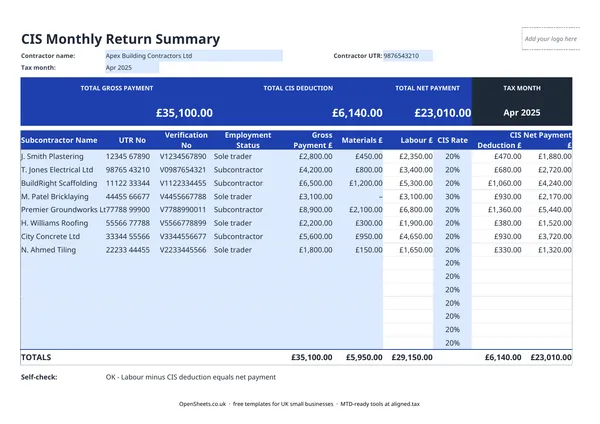
This template gives you one row per subcontractor. You fill in the payment details and the sheet does the arithmetic, including a self-check that catches the most common data-entry mistakes before you file.
Who this template is for
You need to complete a CIS monthly return if you are a contractor who has paid at least one subcontractor during the tax month. In CIS terms, a contractor is anyone who pays subcontractors for construction work. That includes building companies, developers, and any business that regularly pays for construction work.
Subcontractors who also engage their own subcontractors are both a subcontractor (to the firm above them) and a contractor (to the workers below). If you sit in that position, you still have to file a monthly return for your own subcontractors.
You do not file a return for a tax month in which you paid no subcontractors, but you must tell HMRC it is a nil return (again by the 19th).
The key fields and what they mean
Contractor UTR. Your Unique Taxpayer Reference as a contractor. This is how HMRC links the return to your account. It is on your CIS registration letters. Do not confuse it with the subcontractors’ UTRs, which go in their own rows.
Tax month. CIS tax months run from the 6th of one month to the 5th of the next. So the April tax month runs from 6 April to 5 May. Enter the month clearly so you can find each return later.
Verification Status. Before paying a subcontractor for the first time, you must verify them with HMRC. HMRC gives you a verification number and tells you which deduction rate to use. Log that number in this column. It is your evidence that you applied the right rate.
Employment Status. Whether the subcontractor is a sole trader, partnership, or limited company. This affects how the deduction is treated at the subcontractor’s end, so it is worth recording accurately.
Gross Payment, Materials E, and Labour C. The Gross Payment is the total you paid. Materials E is the verified materials cost within that payment. Labour C is what is left after materials are removed, and it is the only figure CIS deductions are applied to. The template calculates Labour C for you.
CIS Rate and Deduction. The rate HMRC gave you on verification (0%, 20%, or 30%). The template applies it to Labour C and shows the deduction amount. The Net CIS Payment is what the subcontractor actually receives after the deduction is taken.
Common mistakes to avoid
Using the wrong deduction rate. Apply the rate HMRC confirmed during verification. If a subcontractor’s circumstances have changed and their rate should have changed, that is for HMRC to tell you, not for you to guess. If in doubt, re-verify.
Including materials in the deduction base. CIS deductions apply to labour only. If you deduct on the full gross amount when a materials element is included, you will over-deduct and the subcontractor will have to claim the excess back through their own tax return.
Filing late. The deadline is the 19th of the month after the tax month ends. So for the month running 6 April to 5 May, the return is due by 19 May. Late returns attract an automatic penalty. Set a recurring reminder for the 15th to give yourself a few days to check the figures.
Not verifying new subcontractors. You must verify a subcontractor with HMRC before you pay them for the first time. Paying without verification means you should be applying the 30% rate, even if the subcontractor tells you they are registered at 20%.
Missing nil returns. If you pay no subcontractors in a tax month, you still need to tell HMRC it is a nil return. Missing the nil return counts as a late return and attracts the same penalties.
Keeping records alongside the return
Filing the return is one thing. Keeping the underlying records is another requirement. HMRC expects you to retain records of every CIS payment for at least three years after the end of the tax year they fall in.
Your records should cover the subcontractor’s name and UTR, the gross payment, any materials element, the rate and deduction applied, and the net amount paid. This template captures all of that. If you keep it up to date month by month, you have your filing data and your record-keeping evidence in the same place.
Keep the subcontractors’ invoices too. They are your evidence for the materials figures and the basis of the payment, and HMRC can ask to see them.
Clean records and tax filing
Good CIS records do more than satisfy HMRC’s immediate requirements. If you run a construction business of any scale, the monthly figures also feed into your annual accounts and tax return: gross payments made to subcontractors are a deductible business expense, the deductions you make on their behalf must be properly reported, and your own accounts should reconcile against the returns you filed.
If your combined income from self-employment and property is over £50,000, Making Tax Digital for Income Tax applies to you from April 2026. The threshold drops to £30,000 from April 2027 and £20,000 from April 2028. Under MTD you keep digital records and send HMRC a quarterly summary of your income and expenses. Clean, well-organised CIS records make those quarterly updates straightforward rather than a scramble.
Aligned (aligned.tax) is free MTD bridging software that connects your existing spreadsheet records to HMRC’s MTD system. If you are already keeping your numbers in a spreadsheet like this one, Aligned sends the quarterly updates to HMRC from the same file. There is no need to move your data into separate accounting software.