What a credit note is and when to use one
A credit note is a document that reduces the amount a customer owes you. Think of it as the opposite of an invoice.
You need one when:
- A customer returns goods
- Something arrives damaged or not as described
- You have overcharged and need to correct it
- You want to cancel an invoice that has already been issued
Never delete or edit an original invoice once it has been sent. That breaks the audit trail. Issue a credit note that references the original invoice number and states the reason, and keep both documents on file.
What a UK credit note must include
What you need on a credit note depends on whether you are VAT-registered.
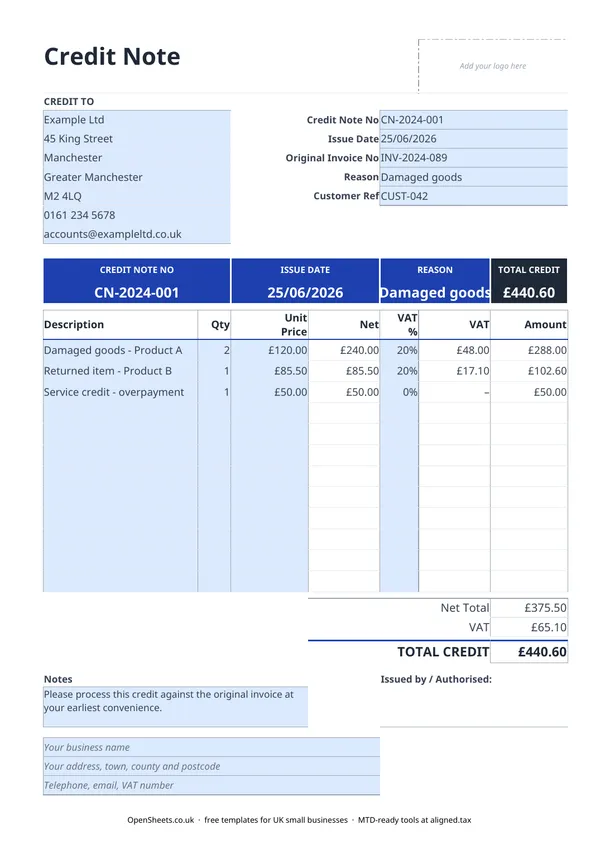
If you are not VAT-registered, there is no strictly prescribed format in law, but a properly kept set of records includes: a unique credit note number, the date, your business name and address, the customer’s name and address, the original invoice number, the reason, a description of what is being credited, and the total amount.
If you are VAT-registered, HMRC has specific requirements. Your VAT credit note must show the words “credit note”, the date, your name, address, and VAT registration number, the customer’s name and address, the original invoice number, the reason for the credit, the net amount being credited, the VAT rate applied, and the VAT amount. This template covers all of it.
VAT on credit notes
When you issue a VAT credit note, the VAT is credited at the same rate as the original invoice.
- Standard-rated (20%). If the original invoice charged 20% VAT, the credit note shows 20% on the credited amount.
- Reduced rate (5%). Same logic. Credit the VAT at 5%.
- Zero-rated (0%) or exempt. No VAT to credit, but show 0% on the line so the record is clear.
When you file your next VAT return, you reduce your VAT liability by the amount on the credit note. Your customer must reduce their input tax claim by the same amount. That is why the VAT figure needs to be shown separately and clearly, not bundled into the total.
Not VAT-registered? Leave the VAT columns blank. The non-VAT version of the template removes those fields to keep things tidy.
Common mistakes to avoid
Editing the original invoice instead of issuing a credit note. If the invoice is already in your records (and in your customer’s records), changing it quietly creates a mismatch that is hard to explain later. Issue the credit note. Keep both documents.
Forgetting to reference the original invoice number. Without that link, reconciling your accounts becomes much harder. Always fill in the Original Invoice No field.
Using the wrong VAT rate. The credit must mirror the original invoice. If you charged 20% on the original, the credit note shows 20%. Applying a different rate, or leaving VAT off a credit for a standard-rated supply, creates errors in both your VAT return and your customer’s.
Not keeping the credit note sequence clean. Credit notes need unique, sequential numbers just as invoices do. A gap in the sequence looks like a missing document in an HMRC review.
Issuing a credit note for a future transaction. A credit note is a correction to something that has already happened. It is not a discount or a quote. If you want to discount a future sale, put that on the invoice itself.
Keeping your records straight
Credit notes are part of your financial records, not just admin for your customer. HMRC expects you to keep all sales documents, including corrections, for at least five years after the 31 January submission deadline for the relevant tax year. In practice, keep everything for six years to be safe.
If your combined income from self-employment and property is over £50,000, Making Tax Digital for Income Tax already applies to you from April 2026. The threshold drops to £30,000 in April 2027 and £20,000 in April 2028. MTD means keeping digital records and sending HMRC a quarterly summary rather than only filing once a year.
If you are getting close to those thresholds, Aligned (aligned.tax) is worth knowing about. It is free bridging software that sends your records to HMRC from the spreadsheet you already keep.