What a pro forma invoice is and who uses it
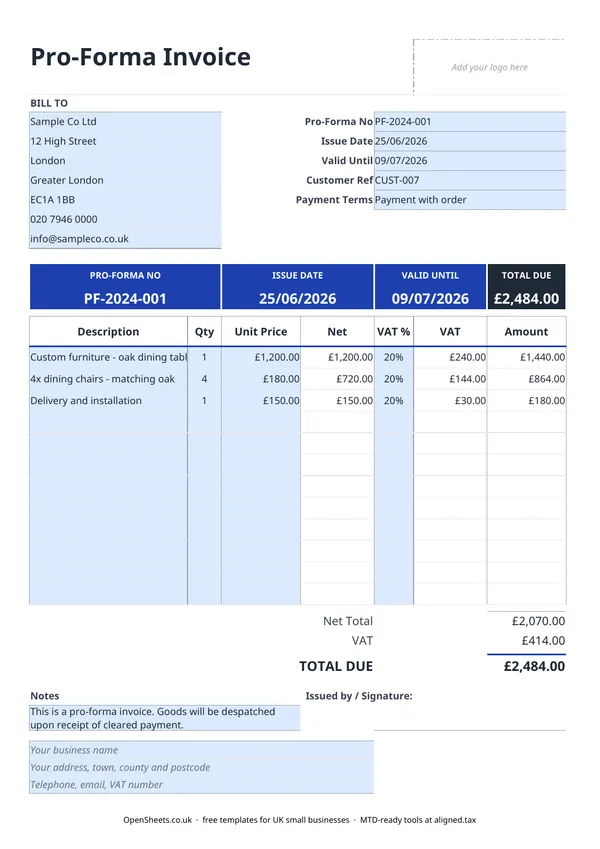
A pro forma invoice is a document that looks like an invoice but is not one. It sets out exactly what you are offering to supply, at what price, on what terms, and by when the offer is valid. The buyer uses it to raise a purchase order, arrange payment, or get internal approval before committing. You follow it with a real invoice once the order is confirmed.
Pro forma invoices are common in a few situations:
- A customer needs a document to release payment (a deposit or payment in full before despatch).
- An overseas buyer needs a pro forma for customs or import paperwork.
- A larger business requires a formal document that matches their purchase-order format before they can raise a PO.
- You want to agree the full scope and price before any goods leave your hands.
In each case the pro forma protects both sides. The buyer knows what they are getting and at what cost. You know the order is real before you commit stock or time.
How a pro forma differs from a standard invoice
A standard invoice is a demand for payment. It records a completed sale, triggers your customer’s obligation to pay, and (if you are VAT-registered) creates a VAT point. It goes in both your records and your customer’s records as an accounting document.
A pro forma invoice does none of those things. There is no VAT point. There is no accounting entry. It is a statement of intent, not a record of a sale. HMRC does not require you to keep pro forma invoices as part of your bookkeeping records (though keeping a copy is sensible). Once payment is received and goods or services are supplied, the pro forma is replaced by a real invoice in your records.
The clearest practical rule: if a customer is asking “how much and on what terms?”, send a pro forma. If they are asking “where is my invoice?”, send a VAT invoice.
VAT on a pro forma invoice
Because a pro forma is not a VAT invoice, the VAT shown on it is an estimate of what will appear on the real invoice. Your customer cannot use a pro forma to reclaim VAT. They need the actual VAT invoice for that.
If you are VAT-registered, use the VAT% column in the template to show the VAT rate and estimated VAT amount. This helps the buyer budget and plan, but both parties should understand the VAT position only crystallises when you raise the real invoice.
If you are not VAT-registered, leave the VAT% column empty. The totals calculate from the net figures only.
Standard UK VAT rates to know:
- 20% is the standard rate and covers most goods and services.
- 5% is the reduced rate, applying to things like domestic energy.
- 0% covers zero-rated goods and services such as most food, children’s clothing, and books.
If you are unsure of the correct VAT rate for a specific product or service, check with HMRC or your accountant before sending.
The Valid Until date
The Valid Until field is one of the most important fields on a pro forma. It protects you if material costs, exchange rates, or your own capacity change between sending the pro forma and receiving the order.
Set a realistic window. Two to four weeks is common for most UK trades. For project work where your time is the main cost, you might set a shorter window if your diary fills quickly. For stock-based businesses, the window should reflect how long you can hold prices against your suppliers.
If a customer comes back after the Valid Until date, you are free to reissue the pro forma with updated figures.
Common mistakes to avoid
Treating a pro forma as a VAT invoice. If you send a pro forma and your customer asks for a VAT invoice, you need to raise a separate, sequentially numbered VAT invoice. A pro forma does not replace it.
Not following up with a real invoice. Once payment is received, raise the real invoice promptly. That is the document that counts for your accounts, your VAT return, and (if applicable) your Making Tax Digital records.
Sending it without a Valid Until date. Without this date your prices are open-ended, which creates problems if costs change before the order is confirmed.
Numbering pro formas in the same sequence as invoices. Keep a separate number sequence for pro formas (PF-001, PF-002, and so on) so your invoice number sequence stays clean and gapless. HMRC requires invoice numbers to be unique and sequential with no gaps.
Keeping records and Making Tax Digital
A pro forma invoice does not itself go into your bookkeeping records. The real invoice that follows it does.
If your combined income from self-employment and property is over £50,000, Making Tax Digital for Income Tax already applies to you from April 2026. It means keeping digital records of your business income and expenses and sending HMRC a quarterly update, rather than only filing once a year. The threshold drops to £30,000 from April 2027 and £20,000 from April 2028.
When that time comes, Aligned (aligned.tax) is worth a look. It is free MTD bridging software that sends your records to HMRC directly from the spreadsheet you already keep.