What a remittance advice is and who sends one
A remittance advice is a short document you send to a supplier alongside a payment. It tells them which invoices the payment covers, the total amount, and how you paid (BACS, CHAPS, cheque, and so on).
Sole traders, small businesses, and anyone in accounts payable uses them whenever they pay a supplier. They are especially useful at month end, when you might be settling several invoices in one bank transfer.
The supplier uses the advice to match the incoming payment to the right invoices on their records. Without one, they have to call or email you to work out what the payment covers. That wastes time on both sides.
The fields on this template
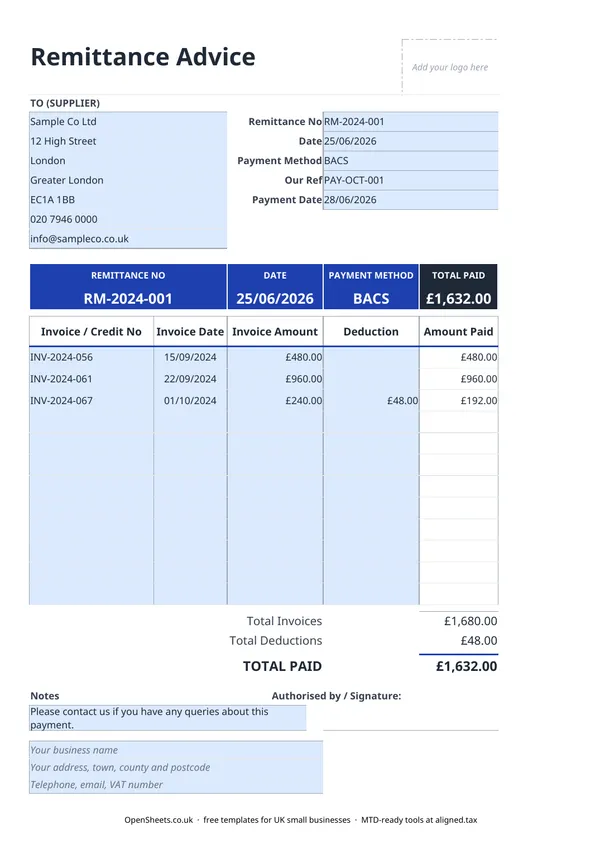
TO (SUPPLIER). The supplier’s name, address, phone, and email. Fill this in so both parties know who the document is for.
Remittance No. A unique reference you assign, such as RM-2024-001. Keep these in sequence so you can find any remittance quickly if there is a query later.
Date. The date you are issuing the remittance, usually the same day you make the payment.
Payment Method. How you are paying. BACS is the most common method for UK business-to-business payments. Others include CHAPS (same-day, higher value), cheque, or card.
Our Ref. Your internal purchase order or payment reference, useful for matching the document to your own records.
Payment Date. The date the funds will arrive with the supplier. For BACS, that is typically two to three working days after you send. Getting this right helps the supplier plan their cash flow.
Invoice / Credit No, Invoice Date, Invoice Amount. One row per invoice or credit note being settled. Fill in each one separately so both sides have a clear record.
Deduction. Any amount you are reducing an invoice by, such as a credit note, an agreed discount, or a retention. The Amount Paid column calculates the net for each line automatically.
TOTAL PAID. This must match your bank transfer or cheque to the penny. If it does not, the supplier’s reconciliation will not balance and they will need to come back to you.
Common mistakes to avoid
Sending a transfer with no remittance. If you pay three invoices in one BACS transfer and send nothing with it, the supplier sees a lump sum land with no context. They cannot match it to the right invoices without calling you. A remittance takes a couple of minutes and saves both sides the chasing.
Wrong payment date. BACS is not instant. If you send on a Wednesday, the money typically arrives on Friday, or later around bank holidays. Put the expected arrival date on the remittance, not the date you pressed send. Your bank’s payment screen will usually tell you the processing date.
Mismatched totals. The TOTAL PAID on the remittance must equal the amount you actually transferred. A rounding error or a missed line will cause a reconciliation problem for the supplier. Double-check before sending.
Unexplained deductions. If you are deducting a credit note or a small discount, list it explicitly in the Deduction column rather than simply sending a smaller amount. A surprise reduction with no explanation is a quick way to cause a dispute.
Reusing remittance numbers. Keep the sequence clean, just as you would with invoice numbers. Gaps and duplicates make it much harder to resolve queries later.
Keeping records straight
A remittance advice sits on the spending side of your books. The purchase invoice records what you owe. The remittance confirms it was paid. Together they give you a clean audit trail for every supplier payment.
Keeping consistent records through the year makes Self Assessment much less of a scramble. If your combined income from self-employment and property is over £50,000, Making Tax Digital for Income Tax applies to you from April 2026. The threshold drops to £30,000 in April 2027 and to £20,000 in April 2028.
If you are getting close to those thresholds, Aligned (aligned.tax) is worth a look. It is free MTD bridging software that sends your records to HMRC straight from the spreadsheet you already use.