What a delivery note is and who uses it
A delivery note goes with a shipment and tells whoever is receiving it exactly what is inside. It lists each item, the quantity ordered, and the quantity actually sent. The recipient checks the goods against the list, signs the note, and hands a copy back to the driver or leaves it with the parcel. You keep that signed copy.
In the UK, delivery notes are standard for any business that sends physical goods. Small manufacturers, wholesalers, trade suppliers, craft makers, and online retailers all use them. If you sell to other businesses, your customers will almost certainly expect one. Even for consumer orders, a delivery note inside the parcel cuts down on disputes and unnecessary returns.
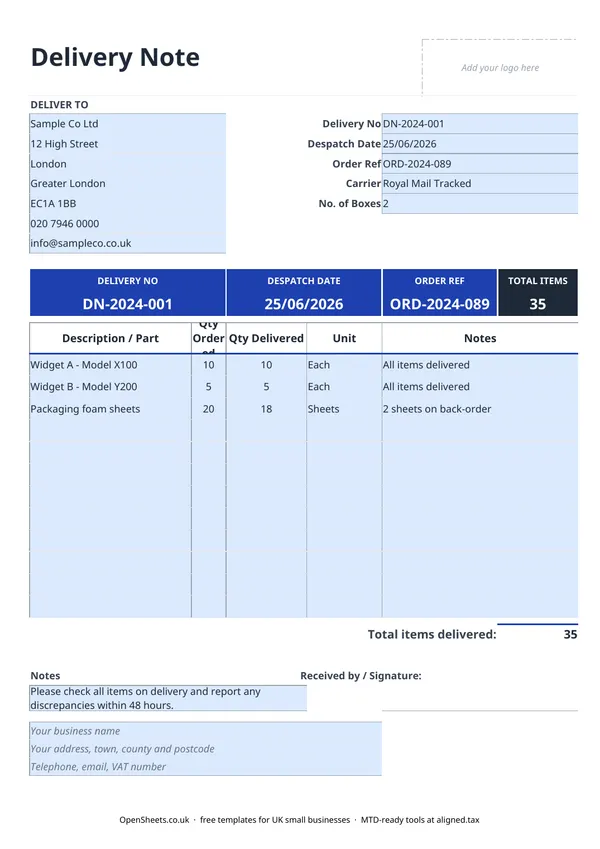
What goes on a UK delivery note
There is no statutory format, but a useful delivery note covers:
- Your business details. Name, address, and contact information so the recipient can reach you quickly if something is wrong.
- Delivery reference. A unique number (for example DN-2024-001) so you and your customer can track this specific shipment.
- Despatch date. The date the goods left you, in dd/mm/yyyy format.
- Order reference. The customer’s purchase order number. This links your delivery note to their system and makes matching it to your invoice straightforward.
- Carrier and number of boxes. Useful when goods are split across multiple packages or go via a courier.
- Line items. Description or part number, quantity ordered, quantity delivered, unit, and any notes (back-orders, substitutions, damaged items).
- Total items delivered. The figure the recipient signs against.
- Received by / Signature. A space for the recipient’s name, signature, and the date they received the goods.
Fill in your business details in the footer block once and they carry through to every delivery note you print.
Quantities ordered and quantities delivered
The two quantity columns are the most important part of the template. Qty Ordered shows what the customer originally asked for. Qty Delivered shows what you are actually sending today.
When everything is available, both figures are the same and no notes are needed. When you are making a partial shipment, enter the full ordered quantity in Qty Ordered and the actual shipped quantity in Qty Delivered, then note the reason in the Notes column. Common reasons include back-orders, items temporarily out of stock, or goods that did not pass a quality check before despatch.
Keeping the two columns separate makes your records honest. The customer can see exactly what they are getting and what is still outstanding. When the remaining items ship, raise a second delivery note with its own reference number.
Matching delivery notes to invoices and purchase orders
A delivery note sits in the middle of a three-document chain: the customer’s purchase order, your delivery note, and your invoice. The Order Ref field is what holds them together. When your customer’s accounts team receives the invoice, they match it to the delivery note and the original purchase order before approving payment. Most trade buyers call this a three-way match, and it is standard practice.
Keep the same Order Ref on your invoice as on the delivery note. If you are raising a final invoice that covers several partial deliveries, list all the relevant delivery note numbers on it. This prevents queries and speeds up payment.
Common mistakes to avoid
Sending a delivery note after the goods. The note should go with the shipment. If it arrives by email a day later, the recipient cannot check the goods against it at the door, and you lose the value of a signed receipt.
Not getting a signature. A delivery note without a signature is just a packing list. The signed copy is what protects you. For courier deliveries, confirm the courier captures a signature or photograph and that you can pull the proof-of-delivery record if you need it.
Mismatched references. If the delivery note says ORD-2024-089 and the invoice says ORD-2024-098, someone in accounts payable will put the invoice on hold. Check the Order Ref before you print.
Leaving the Notes column blank when items are short. If the customer ordered 20 and you are sending 18, write it down. “Partial delivery” tells them nothing useful. “2 units on back-order, expected 15/07/2026” tells them everything they need.
Keeping records and staying organised
Keep the signed copy you get back from each customer alongside the invoice for the same job. If a dispute comes up later, having both to hand means you can sort it quickly and move on.
Good records across your sales documents taken together also make the end of year much less of a scramble. If your self-employment income is growing and Making Tax Digital for Income Tax is on your radar, keeping tidy digital records now is the right habit to build. Aligned (aligned.tax) is free MTD bridging software that sends your records to HMRC from the spreadsheet you already keep. Worth bookmarking for when the time comes.