What a fixed asset register is and who uses it
A fixed asset register is a running record of everything your business owns for long-term use rather than for resale. Office equipment, vehicles, tools, fixtures and fittings, computer hardware: any item that will last more than a year and cost a meaningful amount to replace belongs here.
UK sole traders, landlords, contractors, and small business owners all benefit from keeping one. You do not need a formal balance sheet to make a register worthwhile. The register tells you what you own, what you paid for it, and what it is currently worth in your accounts. That information goes straight into your Self Assessment, your accountant’s year-end workings, and any capital allowance claims.
Depreciation: straight line and reducing balance
Every asset in the register needs a depreciation method. The two options in this template are the methods you will encounter most in UK practice.
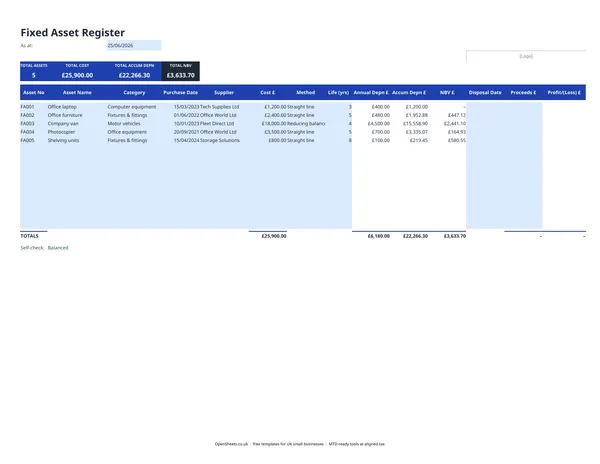
Straight line divides the cost evenly across the asset’s useful life. A laptop costing £1,200 with a three-year life would depreciate at £400 per year until its net book value (NBV) reaches zero. Simple and predictable.
Reducing balance takes a fixed percentage of the remaining NBV each year. A van worth £18,000 depreciated at 25% per year would lose £4,500 in year one, £3,375 in year two, and so on. The annual charge falls over time as the NBV shrinks. This method suits assets that lose value faster in their early years.
The choice of method is an accounting policy decision, not a tax one. HMRC does not accept your depreciation charge as a tax deduction. It treats capital spending differently through the capital allowances system (see the FAQ below).
What the columns mean
Asset No. A unique reference you assign, for example FA001, FA002. Keep it sequential so nothing is missed.
Category. Group assets by type: Computer equipment, Motor vehicles, Fixtures and fittings, Plant and machinery. It keeps the totals readable and matches the groupings your accounts would use.
Cost. The original purchase price including any additional costs to get the asset into use, such as delivery or installation.
Life (yrs). How long you expect the asset to be useful to the business. There is no HMRC rule for accounting life. Use whatever is realistic and stick to it year on year.
NBV. Net book value: cost minus accumulated depreciation. What your accounts say the asset is worth today. Not what it would sell for.
Disposal columns. When you sell or scrap an asset, record the Disposal Date and the Proceeds. The template calculates the profit or loss on disposal automatically. A sale at more than NBV produces a profit; a sale below NBV produces a loss. Both affect your accounts.
Capital allowances and why your register still matters for tax
UK tax works on capital allowances rather than accounting depreciation. The Annual Investment Allowance (AIA) lets most small businesses deduct the full cost of qualifying plant and machinery in the year of purchase, up to the current limit. Check gov.uk for the current AIA limit, as it has changed several times and can change again.
Your fixed asset register feeds into capital allowance claims because it records the original cost and disposal proceeds for every asset. When you sell something, the proceeds are compared against the tax value of the asset (the tax written-down value, which moves differently from your accounting NBV) to calculate balancing allowances or charges. If your accountant handles your Self Assessment, hand them the register at year-end and they will do the rest.
Common mistakes to avoid
Treating revenue costs as capital. Repairs and maintenance are revenue costs, deductible in the year you pay them. Improvements that extend the useful life or add capability are capital costs, going into the register. The line is not always obvious. Replacing a broken window is a repair; adding an extension is capital. When in doubt, keep the invoice and ask your accountant.
Forgetting disposals. If you sell, trade in, or scrap an asset without recording it, your register shows assets you no longer own and your NBV is overstated. Log every disposal at the time it happens.
Not keeping purchase invoices. The register records the cost, but the invoice is the evidence. HMRC can ask for proof of cost if you are claiming capital allowances. Keep invoices alongside the register, either scanned or in a physical file.
Using the same useful life for everything. A laptop and a commercial van have very different useful lives. Applying a single life to all assets distorts both the annual depreciation charge and the NBV totals.
Keeping records and Making Tax Digital
If your combined income from self-employment and property is over £50,000, Making Tax Digital for Income Tax applies to you from April 2026. The threshold drops to £30,000 from April 2027 and to £20,000 from April 2028. Under MTD, you keep digital records and send HMRC quarterly updates of your income and expenses, rather than filing once a year.
Your fixed asset register supports that process. MTD quarterly updates cover income and expenses, not capital items directly. But a clean register means you know your depreciation charge and your disposal figures at any point in the year, so your accounts stay accurate and your accountant has everything they need at year-end finalisation.
If you are already tracking your assets in this spreadsheet, keeping digital records is a habit you have already built. When the time comes to send quarterly updates to HMRC, Aligned (aligned.tax) connects your existing spreadsheets to HMRC’s MTD system for free. You keep your records exactly as you do now. No need to move anything into separate accounting software.