What a general journal is and who uses one
In double-entry bookkeeping, the general journal is where every transaction goes first. You record a debit and a matching credit for each entry, before anything flows through to the individual ledger accounts. It is the complete, chronological record of everything that has happened financially in your business.
In the UK, a general journal is most useful for:
- Sole traders and freelancers who want a proper audit trail rather than a simple income and expenses list.
- Small limited companies where the director handles day-to-day bookkeeping and passes files to an accountant at year-end.
- Landlords with multiple income streams who need to keep property income, expenses, and capital items separate.
- Anyone moving to double-entry bookkeeping for the first time, whether because the business has grown or because an accountant has asked for it.
If you keep your records in a spreadsheet and want them structured properly, this is the right starting point.
How double-entry bookkeeping works
Every financial event has two sides. When a customer pays you, your bank account goes up (debit) and your income account goes up (credit). When you pay a supplier, your bank account goes down (credit) and your expenses account goes up (debit).
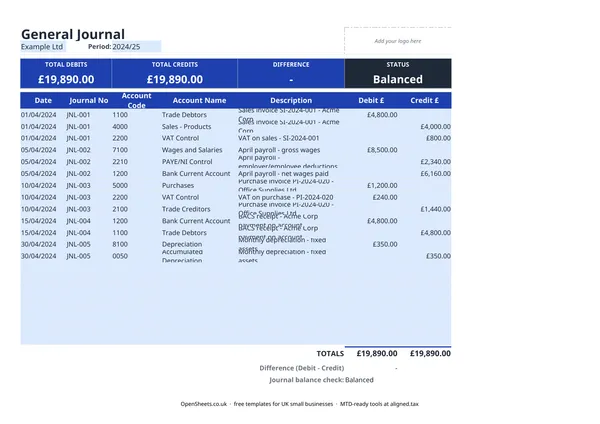
The rule is simple: for every transaction, the total debits must equal the total credits. If they do not, there is a mistake somewhere. The template tracks the running difference at the top of the sheet and shows “Balanced” when everything adds up.
The four main account types behave like this:
- Assets (bank, debtors, equipment): increase with a debit, decrease with a credit.
- Liabilities (creditors, loans, VAT owed): increase with a credit, decrease with a debit.
- Income (sales, rental income): increases with a credit.
- Expenses (wages, rent, repairs): increase with a debit.
You do not need to memorise these. A short chart of accounts kept alongside your journal is enough.
UK-specific things to get right
Tax year alignment. The UK tax year runs from 6 April to 5 April the following year, not the calendar year. If you are filing Self Assessment, your general journal periods should match these dates. Many small businesses also prepare monthly journals to make year-end tidier.
Account codes. The template has an Account Code column. Using a consistent code scheme (even a simple one, like 1000 for bank, 2000 for sales, 3000 for expenses) makes it much easier to pull a trial balance or hand files to an accountant.
Journal numbering. Like invoice numbers, journal numbers must be unique and in sequence with no gaps. The template uses a JNL- prefix by default. Keep the numbering consistent across periods so you can trace any entry back to its source document.
VAT. If you are VAT-registered, VAT collected on sales is a liability (credit to a VAT control account). VAT you have paid on purchases is an asset (debit to the same VAT control account). The net figure is what you owe HMRC. Recording both sides through the journal keeps your VAT reconciliation clean.
Common mistakes to avoid
Entering only one side of a transaction. Every debit needs a matching credit. If you record a payment out of your bank and forget the corresponding expense debit, the journal will not balance and your accounts will be wrong. Always check the Difference figure before moving on.
Vague descriptions. “Payment” or “Transfer” tells you nothing when you review entries six months later. Write enough in the Description field to identify the transaction without hunting for the source document. Include invoice numbers, supplier names, or period references.
Mixing personal and business transactions. If personal spending goes into the journal, it needs to go to a Drawings account (for sole traders) or a Director’s Loan account (for limited companies), not to business expenses. Blurring this line creates problems at year-end and can attract attention during an HMRC check.
Not reconciling regularly. A general journal is only useful if it matches your bank statements. Reconcile at least monthly. Errors that would take ten minutes to fix in the month they happen can take hours to untangle six months later.
Losing the source document. The journal entry is the record. The invoice, receipt, or bank statement is the evidence. Keep both. HMRC can ask to see source documents if they review your accounts.
Keeping clean records for tax and Making Tax Digital
A well-kept general journal is exactly what HMRC wants to see if it ever reviews your accounts. It is also the kind of digital record that sits at the centre of Making Tax Digital for Income Tax.
If your combined income from self-employment and property is over £50,000, Making Tax Digital for Income Tax applies to you from April 2026. The threshold drops to £30,000 from April 2027 and to £20,000 from April 2028. Under MTD, you keep digital records of your income and expenses and send HMRC a quarterly summary rather than one annual return.
If you are already keeping a structured general journal in a spreadsheet, the records are there. You just need a way to send them to HMRC in the right format. Aligned (aligned.tax) does that. It is free MTD bridging software that reads your spreadsheet and sends the quarterly update to HMRC on your behalf. You carry on using the same spreadsheet. Nothing moves to separate accounting software.