What a job costing template does and who needs one
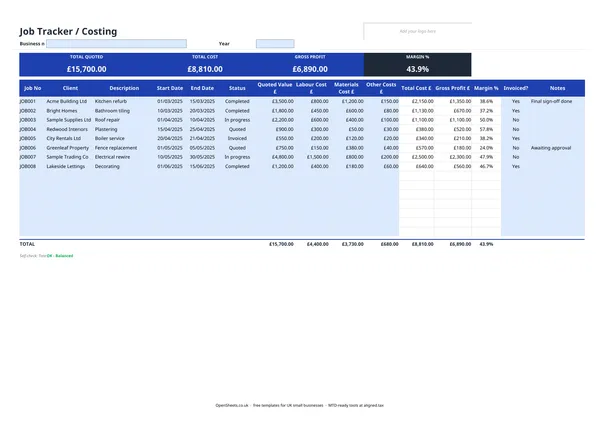
A job costing template lets you track the finances of each piece of work individually rather than lumping everything together. For every job you record what you quoted, what you actually spent on labour, materials, and other costs, and what profit you made. The template calculates gross profit and margin automatically.
This kind of visibility matters if your work varies from job to job. A builder might make 50% margin on a loft conversion and lose money on a small kitchen refurb. Without a job costing sheet, both jobs look the same in the bank account. With one, you can see which types of work are worth quoting for and which are not.
The template suits UK tradespeople and project businesses: builders, decorators, plumbers, electricians, kitchen fitters, freelance designers, IT consultants, and anyone else who quotes for individual pieces of work.
The columns and what to put in them
The Job Tracker sheet has one row per job. Here is what each section is for.
Job identification. Job No, Client, Description, Start Date, End Date. The job number keeps your records organised and matches up with your invoices. Use a simple running sequence: JOB001, JOB002, and so on.
Status. A dropdown with five options: Quoted, In progress, Completed, Invoiced, and Cancelled. Keep this updated and you will always know what work is live and what needs an invoice raising.
Quoted Value. What you told the client the job would cost. This is the figure you are measuring your actual costs against.
Cost columns. Labour Cost, Materials Cost, and Other Costs. Fill in each separately so you can see where the money goes. Total Cost is calculated from these three. Breaking costs down like this also helps you quote more accurately on future jobs.
Gross Profit and Margin %. Both are calculated. Gross Profit is Quoted Value minus Total Cost. Margin % is Gross Profit divided by Quoted Value. These are the numbers that tell you whether the job was worth doing.
Invoiced?. A yes/no flag. It is easy to skip, but a completed job with no invoice raised is money you have earned and not collected. That is worth five seconds to tick.
Notes. Free text for anything useful: whether sign-off has been given, a subcontractor’s name, a variation agreed after the original quote.
The summary band
At the top of the sheet, a summary band shows your totals across all jobs: Total Quoted, Total Cost, Gross Profit, and overall Margin %. These figures update as you add rows. Checking them regularly gives you a quick read on how the business is performing overall, not just on individual jobs.
Common mistakes to avoid
Entering costs inclusive of VAT. If you are VAT-registered, your costs and quoted values should go in exclusive of VAT. Mixing VAT-inclusive and exclusive figures will distort your margin calculation. Keep everything on the same basis.
Not splitting costs by type. It is tempting to enter a single total cost figure and move on. But splitting labour from materials from other costs is worth the extra minute. Over a few months you will see patterns: whether labour is eating into margin more than expected, or whether material costs are higher on certain types of job.
Forgetting to update the Status column. A job that stays as “In progress” for six months when it finished three months ago makes it hard to see what work is genuinely live. A few seconds updating the status each time you close out a job keeps the tracker meaningful.
Missing the Invoiced? flag. Completed jobs that slip past without an invoice raised are lost revenue. The Invoiced? column is there precisely to prevent this. Build a habit of running your eye down it at the end of each week.
Not comparing quoted versus actual on similar jobs. The real value of a job costing sheet comes over time. After a year of data, you can look back at all your kitchen installations or all your decorating contracts and see where your estimates were accurate and where they were not. That informs your next set of quotes.
Keeping records for tax
Your job costing sheet is a business record. HMRC expects self-employed people to keep accurate records of their income and expenses. The totals from this tracker feed straight into your Self Assessment return: your total turnover is the sum of all invoiced jobs, and your allowable business expenses are the labour and materials costs you have recorded here, plus anything else you track separately.
If your combined income from self-employment and property is over £50,000, Making Tax Digital for Income Tax already applies to you from April 2026. The threshold drops to £30,000 from April 2027 and £20,000 from April 2028. Under MTD you send HMRC a quarterly summary of your income and expenses, rather than filing once a year.
If you are getting close to any of those thresholds, Aligned (aligned.tax) is worth a look. It is free bridging software that sends your records to HMRC directly from the spreadsheet you already use.