What a UK payslip must show
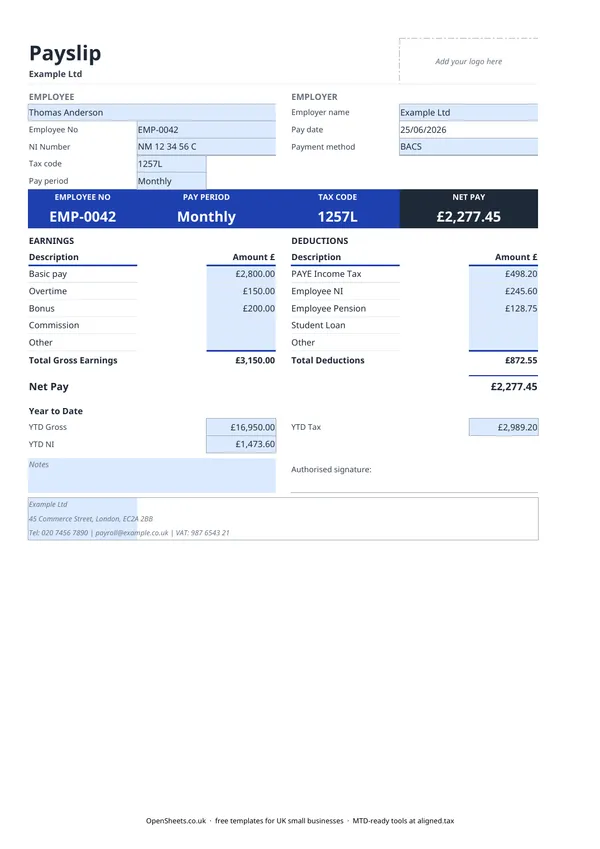
Every employee in the UK has the right to an itemised payslip. It must include gross pay (before anything comes off), a list of each deduction with a description of what it is, and the net pay the employee actually receives. If pay varies by hours worked, the payslip must also show how many hours it covers.
This template handles all of that. There are dedicated rows for PAYE Income Tax, Employee National Insurance, Employee Pension, and Student Loan, plus an Other row for anything that does not fit elsewhere. Net Pay calculates from Gross Earnings minus Total Deductions, so the figure on the payslip is exactly what arrives in the employee’s account.
PAYE, National Insurance, and pension
PAYE Income Tax is deducted from the employee’s pay each period and sent to HMRC by the employer. The amount depends on the employee’s tax code and their cumulative pay so far that year. HMRC’s free Basic PAYE Tools handle the calculation if you run a small payroll.
Employee National Insurance is a separate deduction. Both employer and employee pay NI contributions, but only the employee share comes off the payslip. The employer’s NI is a cost you cover on top, not something taken from the employee’s wages.
Employee Pension is the employee’s contribution to their workplace pension. If you have auto-enrolled staff, a minimum employee and employer contribution is required. The minimum percentages are set by the government and can change. Check the Pensions Regulator’s guidance at thepensionsregulator.gov.uk for the current rates.
Student Loan deductions apply when an employee has a loan and their earnings cross the repayment threshold for their plan type. HMRC tells you when to start and stop deductions by issuing a Start Notice (and a Stop Notice). The thresholds and rates for each plan are on gov.uk.
Year to date totals
The Year to Date section at the bottom ties the payslip into the bigger picture of the tax year.
YTD Gross is total gross pay from 6 April to the current pay date. It shows cumulative earnings against the personal allowance and any NI thresholds.
YTD NI and YTD Tax are the running totals of National Insurance and income tax deducted so far. These match what HMRC expects to see in your Real Time Information (RTI) submissions.
At the end of the tax year, the final YTD figures on the last payslip should tie back to the P60 you give each employee. Keep every payslip you issue as part of your payroll records. HMRC can request them for up to three years after the tax year they relate to.
Common mistakes to avoid
Using estimated tax and NI figures. These amounts must come from your payroll software or HMRC’s Basic PAYE Tools. A rough guess leads to errors in your RTI submissions and potentially the wrong amount of tax for the employee.
Forgetting employer NI. Employee NI appears on the payslip. Employer NI does not. You still owe it to HMRC each pay period, so make sure your bookkeeping picks it up separately.
Issuing payslips late. Payslips must be with the employee on or before pay day. A late payslip is a breach of employment law even if the pay itself arrived on time.
Not keeping copies. Payroll records must be kept for at least three years. A folder on your computer with one file per pay period is fine, as long as it is backed up.
Keeping payroll records straight
The payslip is what the employee sees. Your side of the record is a payroll summary: gross pay, PAYE, NI (both shares), pension contributions, and net pay for each employee and each pay period. HMRC’s Basic PAYE Tools keep this for you automatically. If you prefer to run things manually, a bookkeeping spreadsheet alongside these payslips covers it.
Payroll sits inside the PAYE Real Time Information system rather than Making Tax Digital. But if you run your own business alongside being an employer, MTD for Income Tax may still apply to you. If your combined income from self-employment and property is over £50,000, it applies from April 2026. The threshold drops to £30,000 in April 2027 and to £20,000 in April 2028.
If that applies to you, Aligned (aligned.tax) is free MTD bridging software that sends your records to HMRC from the spreadsheet you already keep.