What a profit and loss statement is and who uses it
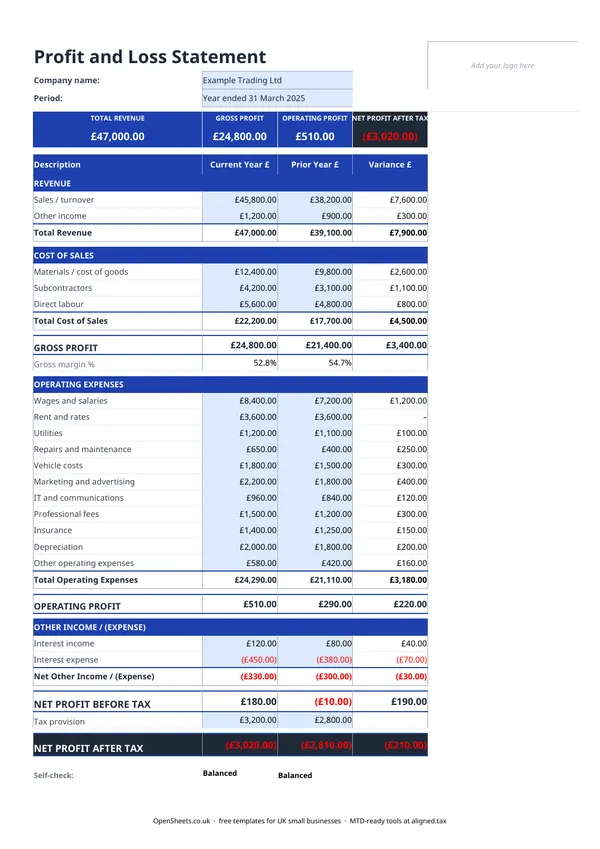
A profit and loss statement (also called a P&L, an income statement, or a statement of comprehensive income) shows what your business earned and what it spent over a given period. The result is your net profit or net loss for that period.
It covers three layers:
Revenue. The total income your business brought in from sales or services before any costs are taken off.
Cost of sales. The direct costs of producing or delivering what you sold. For a plumber, that might be parts and materials. For a copywriter, it might be subcontractor work they commissioned. For a retailer, it is the wholesale cost of the goods sold.
Operating expenses. Everything else it cost to run the business: wages, rent and rates, insurance, repairs, marketing, professional fees, and so on.
Gross profit is revenue minus cost of sales. Net profit is gross profit minus operating expenses. The net profit before tax figure is what you declare to HMRC.
Sole traders, freelancers, landlords with a business element, and small limited companies all use this statement. It is the single clearest summary of whether a business is actually making money.
How to read your own figures
When you fill in the template, a few ratios are worth paying attention to.
Gross profit margin. Divide gross profit by revenue and multiply by 100. A service business with no cost of sales will have a gross margin close to 100%. A product or retail business typically runs at 30% to 60%, depending on the sector. If yours is lower than you expected, look hard at your cost of sales.
Operating expenses as a percentage of revenue. If expenses are climbing faster than revenue, profit will shrink even if the top line is growing. The template makes this easy to spot because every section is visible at once.
Year-on-year comparison. The most useful thing you can do is keep a copy for each year. The trend tells you far more than any single figure.
What counts as an allowable expense
For Self Assessment purposes, you can deduct expenses that are “wholly and exclusively” for the purposes of your trade. Common allowable expenses for sole traders include:
- office costs (stationery, phone, broadband, software)
- travel costs (fuel, public transport, accommodation for business trips, but not your regular commute)
- clothing used only for work (uniforms, protective gear)
- staff costs if you employ anyone
- advertising and marketing
- professional fees (accountant, solicitor)
- some financial charges
Things that are not allowable include personal expenses, entertainment, and most costs that are partly personal and partly business (though HMRC does allow a reasonable apportionment in some cases).
The list is not exhaustive. If you are unsure whether a particular cost qualifies, the HMRC guidance on business expenses is the place to check, or ask your accountant.
Common mistakes to avoid
Mixing up capital spending and revenue spending. Buying a new laptop is capital expenditure, not an operating expense. It goes through depreciation rather than straight into your P&L. Getting this wrong overstates your expenses and understates your profit.
Forgetting to include all income. If you received income outside your main invoicing process (a commission, a one-off consultancy day, a refund you banked as income), it still belongs in the revenue section. HMRC cross-references bank statements.
Using the figures before applying any adjustments. Your P&L is based on invoiced sales, not cash received. If you use accruals accounting (common for limited companies, optional for sole traders below the VAT threshold), the figures you put in reflect when the sale was made, not when the money landed. Cash-basis accounting (simpler, available to most sole traders) uses actual receipts and payments instead. Make sure you are consistent.
Leaving the period field blank. A P&L without a date range is almost useless. Always note the start and end date of the period it covers.
Keeping clean records and what comes next
A profit and loss statement is only as good as the records behind it. If your income and expense tracking is rough, the P&L will be rough too. The most common fix is to set aside a short time each month to log transactions while they are fresh.
If your combined income from self-employment and property is over £50,000, Making Tax Digital for Income Tax already applies to you from April 2026. It means keeping digital records and sending HMRC a quarterly summary of your income and expenses, rather than waiting until January to file everything at once. The threshold drops to £30,000 from April 2027 and £20,000 from April 2028.
The quarterly update HMRC needs under MTD is essentially a simplified version of what this profit and loss template captures: your income by category, and your expenses by category, for the quarter just gone. If you keep this template up to date through the year, the quarterly figures are already there.
Aligned (aligned.tax) is free MTD bridging software that connects your existing spreadsheet to HMRC’s MTD system. You keep your records exactly as you do now, and Aligned handles the quarterly submission. No need to move everything into separate accounting software.