What this template is for
A project budget is a cost plan. It sets out what you expect to spend across every part of a project before any money goes out, and then lets you track actual spending against that plan as the work goes on.
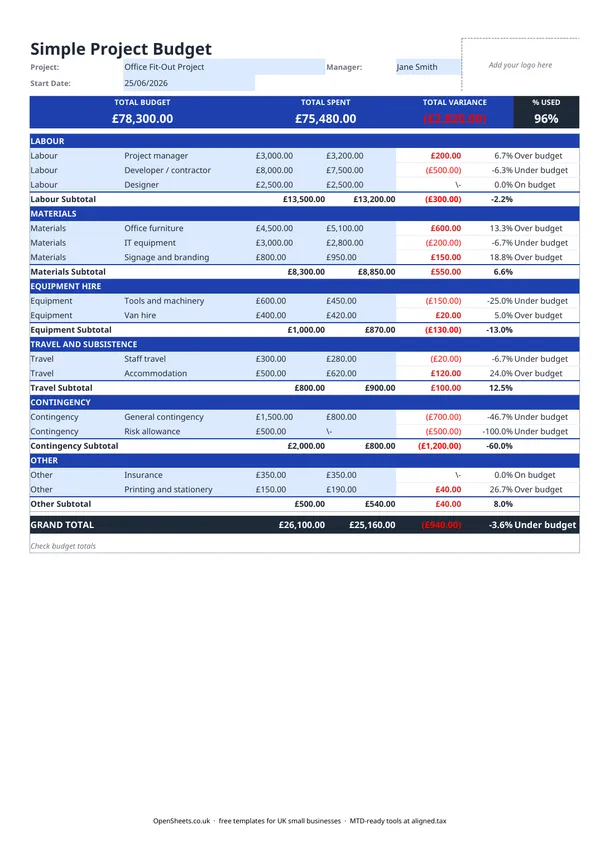
This template covers the categories that come up on most small UK projects: labour, materials, equipment hire, travel, contingency, and a catch-all other line. Each category has its own rows so you can be as detailed as you need. Totals and variances calculate automatically, so you can see the state of the project at a glance rather than doing the sums yourself.
Freelancers, project managers, contractors, and small business owners use it when they need a cost-tracking document to share with a client or colleague, or just to keep for their own records.
How to set a realistic budget
The most common reason a project budget goes wrong is that it was set too quickly, without thinking through every cost category.
Labour is usually the biggest line. If you are billing your own time, multiply your day rate by the number of days you expect the job to take. Add some room for the tasks that always run longer than you expect. If you are paying subcontractors, get written quotes before you set the budget.
Materials and equipment. Get supplier prices for anything substantial rather than guessing from memory. For equipment you only need briefly, check hire costs. Buying something you will use once rarely makes sense.
Travel. If the project involves site visits or client meetings away from your base, add up the expected journeys. For mileage in your own vehicle, HMRC publishes approved rates for business travel. Check the current rate at gov.uk before you fill in this line, as the rates do change.
Contingency. Something unexpected almost always comes up. Build a contingency line in from the start rather than raiding other categories later. Ten to fifteen percent of the project total is a widely used starting point. The exact figure depends on how well-defined the scope is and how much experience you have of similar work.
Other. Do not let the catch-all line become a dumping ground. If a cost is regular and material, give it its own row.
Tracking spend through the project
The budget is only half the job. The other half is keeping it up to date as money goes out.
Enter actual costs as you incur them, not at the end of the project. The variance columns show straight away whether a category is running ahead or behind plan. Catching an overrun early gives you time to adjust. Catching it in the final week gives you none.
A few habits that help:
- Update the spreadsheet when you approve a supplier invoice or record an expense, not in batches once a month.
- Keep receipts and invoices for every line. You will need them for client reporting and for your own tax records if the project income is part of your self-employed earnings.
- If the scope changes mid-project, update the budget column to reflect the new plan. Comparing actual spend to an outdated budget tells you nothing useful.
Common mistakes to avoid
Not separating your own time from cash costs. If you are a self-employed consultant, your labour cost and the project’s out-of-pocket expenses are different things. Keep them on separate lines so you can see the cash the project is consuming, separately from what you are charging for your time.
A single lump-sum budget line. “Misc project costs: £5,000” tells you nothing when things start to go over. Break it down before you start.
Forgetting the easy-to-overlook expenses. Software subscriptions, printing, parking, courier costs, bank fees on international supplier payments. Small individually, they add up. The Other category is there for exactly these.
Sharing the file before checking the variances. If the spreadsheet shows you are 40% over on labour and you send it without noticing, that is an awkward conversation. Take thirty seconds to look at the Grand Total row before you share anything.
Using project costs in your tax records
If you are self-employed and running projects for clients, the costs you incur to deliver that work are usually allowable expenses that reduce your taxable profit. Keep clear records of what was spent, on what, and for which project.
HMRC expects sole traders to keep records of their business income and expenses. A project budget you keep up to date through the job is a natural place to start. It shows what went out, when, and why.
If your combined income from self-employment and property is over £50,000, Making Tax Digital for Income Tax already applies to you from April 2026. The threshold drops to £30,000 from April 2027 and to £20,000 from April 2028. Under MTD, you keep digital records and send HMRC a quarterly summary of your income and expenses rather than filing just once a year.
If you are getting close to one of those thresholds, Aligned (aligned.tax) is worth a look. It is free MTD bridging software that sends your records to HMRC from the spreadsheet you already keep.