What a project task tracker does
A project task tracker is a single list of everything that needs to happen on a project, who is doing it, when it is due, and how far along it is. That sounds simple, but getting it into one place and keeping it up to date is what separates projects that finish on time from projects that quietly slip.
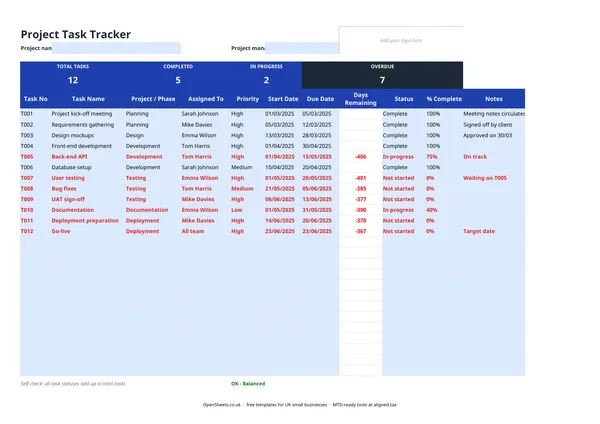
This template covers the essentials without adding overhead. Each task gets a row. Each row has a task number, a name, a project or phase label, an owner, a priority, a start date, a due date, and a status. The summary panel at the top counts how many tasks are complete, in progress, or overdue, so the overall picture is visible the moment you open the file.
UK freelancers, small agencies, tradespeople managing a job schedule, and anyone running a project without a dedicated project-management tool will find it easy to pick up and easy to share with a client or hand off to a team member.
Setting up your tracker
The most important thing to get right at the start is your task numbering. Give every task a unique reference (T001, T002, and so on) and keep it consistent. When you are discussing a task in an email or a meeting, a reference number removes any ambiguity about which task you mean.
Group tasks by project or phase using the Project/Phase column. If you are running two or three small projects at once, a single tracker with clear labels is usually easier to maintain than three separate files. You can sort or filter by the Project/Phase column to focus on one project at a time.
Set realistic due dates and update the Status column as work moves forward. The Days Remaining column flags overdue tasks automatically. A negative number means the task is past its due date, so nothing slips through without you noticing.
Common mistakes to avoid
Not assigning an owner. A task with no name against it tends not to get done. Even if you are a solo freelancer, writing your own name makes it a commitment rather than a wish list.
Using vague task names. “Sort website” is not a task. “Write copy for the About page” is. Clear, specific task names make it easier to estimate time, assign work, and know when something is actually finished.
Letting the tracker go stale. A project tracker is only useful if it reflects reality. A few minutes at the start of each week to update statuses is enough to keep it honest. If you only update it before client meetings, you are producing a report rather than managing the project.
Too many priority levels. If everything is High, nothing is. Keep it to three levels at most (High, Medium, Low) and use High only for things that genuinely block other tasks or carry a real deadline consequence.
Forgetting to capture blockers. The Notes column is there for a reason. When a task is stuck, write down why. It saves the next conversation about the same task.
Keeping records as a freelancer
If you are a UK freelancer or sole trader, your project work is your business income. The task tracker itself is not a financial record, but it sits alongside the documents that are. A clear record of what was agreed, when it was delivered, and what was invoiced is useful cover if a client disputes something or HMRC has questions about your income.
If your combined income from self-employment and property is over £50,000, Making Tax Digital for Income Tax applies to you from April 2026. The threshold comes down to £30,000 from April 2027 and £20,000 from April 2028. Under MTD, you keep digital records of your business income and expenses and send HMRC a quarterly summary, rather than filing only once a year.
If you already keep your income and expenses in a spreadsheet, Aligned (aligned.tax) can send those records to HMRC on your behalf, with no need to move your data into separate accounting software.