What this template is for
A recruitment tracker is a single spreadsheet that keeps tabs on every candidate as they move through your hiring process. Without one, it is easy to lose track of who is at what stage, miss follow-up dates, or forget what you offered someone three weeks ago.
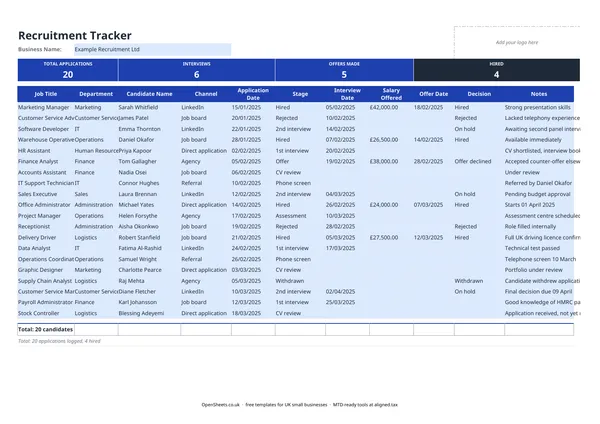
This template is for small UK businesses and sole traders who are hiring without a dedicated HR system. You get one row per candidate, a Stage column you update as things progress, and a summary at the top that counts how many people are at each point in the process.
The columns and what to put in them
The tracker follows a straightforward left-to-right flow:
Job Title and Department. If you are hiring for more than one role at once, these two columns let you filter quickly and keep candidates for different teams separate.
Candidate Name and Channel. Record where each candidate came from: a job board, LinkedIn, a referral, a direct application. Over time this tells you which channels are worth the money and which are not.
Application Date and Stage. The date goes in dd/mm/yyyy format. The Stage column should reflect where the candidate is right now. Update it each time they move forward or drop out. The summary at the top of the sheet counts how many candidates are at each stage automatically.
Interview Date, Salary Offered, and Offer Date. Fill these in as the process moves on. Having a written record of what salary figure you offered and when is useful if a dispute arises later.
Decision and Notes. Mark the outcome: Hired, Rejected, or On Hold. Use the Notes column for anything the other fields do not capture, such as the reason a candidate withdrew or a note that you would consider someone for a future role.
UK legal points to keep in mind
Data protection
Candidate data is personal data under UK GDPR and the Data Protection Act 2018. That means a few things in practice.
You need a lawful basis for holding it. For recruitment, the most common basis is legitimate interests (you are assessing someone for a job). You should document that basis.
You must not keep it longer than necessary. The Information Commissioner’s Office (ICO) suggests that records relating to unsuccessful candidates should generally be deleted around six months after a recruitment round closes, though you should check the current ICO guidance for the specifics. Successful candidate records become part of the employment file and are subject to different retention rules.
Candidates can ask to see their data at any time. A Subject Access Request must usually be fulfilled within one month. Keep the tracker in a secure location with restricted access so that responding to a SAR is straightforward rather than a scramble.
Equal opportunities
The Equality Act 2010 protects candidates from discrimination on the basis of protected characteristics, including age, sex, race, disability, and others. You do not need a formal equal opportunities policy if you are a very small employer, but it is good practice to treat candidates consistently, document your decisions, and be able to show why you chose the person you hired over others you did not.
If you run voluntary equal opportunities monitoring, keep that data separate from this tracker and anonymous.
IR35 for contractor roles
If you use this tracker for contractor vacancies, note that IR35 (off-payroll working rules) may affect how you engage and pay the worker. The rules changed in April 2021 for medium and large businesses, placing the responsibility for determining employment status on the client rather than the contractor. If you are a small business, different rules may apply. This area is worth checking with an accountant before you confirm a contractor engagement.
Common mistakes to avoid
Not updating the Stage column in real time. A tracker only works if it reflects where things actually are. Set a habit of updating it the same day as each interview or decision.
Holding candidate data longer than you need to. It is tempting to keep a pool of CVs “just in case”. Under UK GDPR, you need a fresh reason to do that. Either ask candidates for consent to retain their details for future roles, or delete records once the retention period has passed.
Mixing up salary figures across stages. If you negotiate and adjust an offer, update the Salary Offered column and add a note. Having the wrong figure on record can create confusion later.
Not recording the reason for rejection. You do not have to give candidates detailed feedback, but having a brief internal note helps if a candidate later questions the decision or claims discrimination.
Keeping tidy records
This tracker is the kind of record that saves time twice: once during the recruitment process, and again later if a decision is ever questioned. Pair it with a simple employee record once someone starts and you have a clean account of how every hire happened.
If your combined income from self-employment and property is over £50,000, Making Tax Digital for Income Tax applies to you from April 2026. The threshold drops to £30,000 from April 2027 and £20,000 from April 2028. If you reach that point, Aligned (aligned.tax) is free MTD bridging software that sends your records to HMRC from the same spreadsheet you already keep.