Tracking sick leave without the paperwork pile
If you employ even one person, you need some way of recording absences. Without it, you cannot reliably work out whether Statutory Sick Pay applies, you cannot spot a pattern of Monday absences, and you have no paper trail if a disciplinary conversation becomes contentious later.
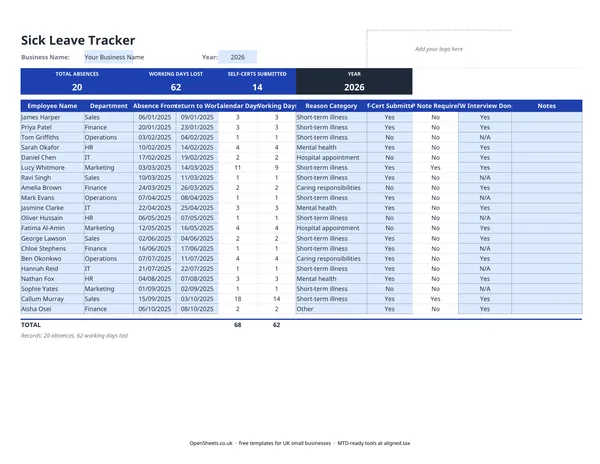
This free spreadsheet gives you one row per absence spell. You record the dates, days lost, whether a self-certification or fit note was received, and whether a return-to-work meeting was done. The totals at the bottom add up across all employees so you have a clear picture at the end of the year.
What the columns are for
The template uses these columns: Name, Department, Absence From, Absence To, Days Lost, Self-Cert Submitted, Absence Frequency, Reason Category, Fit Cert Submitted, Note Required/Meeting Done, Interview Date, and Notes.
Most are self-explanatory, but a few are worth explaining.
Absence Frequency counts the number of separate spells for each employee. Two separate two-day absences is a different pattern from one four-day absence, even though the total days are the same. This column makes that visible.
Reason Category groups absences by type, for example Short-Term Illness, Mental Health, or Injury. This is useful if you review absence data at the end of the year or are preparing for a difficult conversation with a team member. It is not a medical diagnosis column. Use the broad categories your HR policy already defines.
Note Required/Meeting Done is a prompt. ACAS guidance recommends a return-to-work conversation after every absence, however short. This column lets you record that it happened.
Statutory Sick Pay: the basics
UK employers are generally required to pay Statutory Sick Pay (SSP) to eligible employees who are off sick for four or more consecutive days, including non-working days. SSP runs from the fourth day onwards.
Whether an employee qualifies depends on their earnings and contract. The SSP rate and the weekly earnings threshold change each April, so check the current figures on gov.uk rather than relying on any figure you find here. The SSP section of the HMRC employer guidance is the place to look.
The sick leave tracker does not calculate SSP automatically. It gives you the dates and days-lost figures you need to make the calculation yourself or pass to your payroll provider.
Self-certification and fit notes
For absences of seven calendar days or fewer, an employee self-certifies. HMRC publishes a form called SC2, but you can use your own equivalent. The template’s Self-Cert Submitted column is your prompt to collect one.
For absences of more than seven calendar days, a fit note (sometimes still called a sick note or doctor’s note) is required. The fit note comes from a GP, hospital doctor, nurse, or physio, depending on the condition. It may say the employee is “not fit for work” or “may be fit for work” with adjustments. The second option is worth reading carefully. A phased return or adjusted duties can get a good employee back on track sooner than waiting for full fitness.
Common mistakes small employers make
Letting absences go unrecorded. The conversation feels awkward and time is tight, so nothing gets written down. This creates problems when you need to assess SSP, when a return-to-work meeting is overdue, or when a pattern needs addressing. A quick entry in this tracker at the start and end of each absence takes a few minutes.
Treating all absence the same. A single three-week absence for surgery is a very different situation from ten separate one-day absences across a year. The Bradford Factor and your own judgment both need the pattern data. This template gives you both the individual spell count and the total days.
Missing the fit note deadline. If an employee is still off after seven calendar days and you have not received a fit note, follow up. Without one, your SSP records are incomplete.
Storing absence records alongside other HR data without access controls. Absence data is personal data. Under UK GDPR, you are the data controller and you are responsible for keeping it secure. Do not leave this file in a shared folder where everyone in the business can see it.
A note on records if you use Aligned
If you have employees, your business already has income and expenses to track alongside payroll. Most small employers using this tracker are running their own books too, and if your combined income from self-employment and property is over the relevant threshold, Making Tax Digital for Income Tax applies to you. The threshold is £50,000 from April 2026, dropping to £30,000 from April 2027 and £20,000 from April 2028.
When that applies, Aligned (aligned.tax) is worth knowing about. It is free MTD bridging software that lets you send quarterly income and expense updates to HMRC straight from the spreadsheet you already keep, without moving everything into separate accounting software.