What a staff rota template does
A staff rota is the weekly plan that tells each employee when they are working. For a small UK business with even a handful of staff, keeping that plan in a consistent, dated spreadsheet saves time, cuts scheduling errors, and gives you a record to go back to if questions come up later.
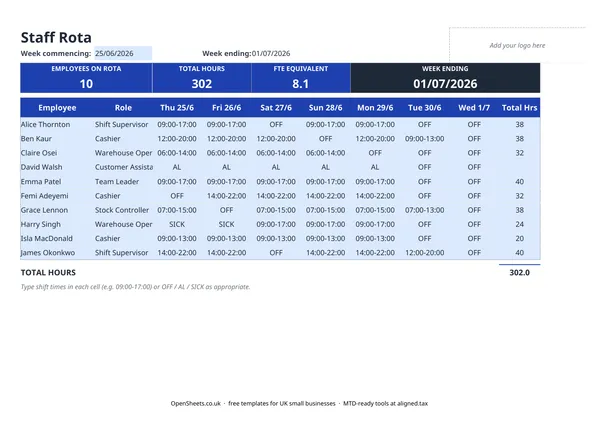
This template covers one week at a time. Each row is one employee. The columns are the days of the week, and you enter the shift hours for each day or mark the person as off or sick. The totals and the FTE equivalent figure at the top right update as you type. When the week is done, save a copy and start a fresh one.
It works for any small UK employer with shift workers: a cafe, a retail unit, a small warehouse, a letting office, a cleaning company.
What the columns do
Employee and Role. One row per person. The role column (Shift Supervisor, Cashier, Warehouse Operative, and so on) is worth filling in because it lets you check at a glance whether you have the right cover on each day, not just the right number of people.
Day columns. Enter the shift start and end time in each cell, for example 09:00 to 17:00. Enter OFF for a day off, SICK if the person is absent sick. Both are handled. The sheet does not care which days your week starts on: just set the week commencing date in the header and the column labels follow.
Total Hrs. The weekly total for each employee, worked out automatically from whatever you have entered. This is the number that goes into payroll for hourly workers.
Header summary boxes. The Employees on Rota count, Total Hours, FTE Equivalent, and Week Ending date all sit at the top. One glance and you know whether the week is covered.
UK rules to keep in mind
Working hours and the 48-hour week
Under the Working Time Regulations 1998, most workers cannot be required to average more than 48 hours a week, measured over a reference period (usually 17 weeks). Workers can sign an opt-out, but they cannot be pressured into doing so. The rota does not flag this automatically. If any employee’s hours are consistently high over several weeks, check gov.uk or take HR advice.
Rest breaks and rest periods
Workers are generally entitled to a rest break of at least 20 minutes if they work more than 6 hours in a day. They are also entitled to at least 11 hours between shifts each day, and at least 24 consecutive hours off each week. Young workers (under 18) have different, stricter entitlements. Check gov.uk for the current rules before setting schedules.
Holiday entitlement
Full-time workers in the UK are entitled to at least 5.6 weeks of paid annual leave per year, including bank holidays. Part-time and irregular-hours workers accrue leave in proportion to the hours they work. The rota does not calculate holiday entitlement. Track it separately, and check gov.uk or the employment contract if you are unsure of the exact figure.
Statutory sick pay
If an employee qualifies for Statutory Sick Pay, the rate and eligibility rules are set by the government and change from time to time. Check gov.uk for the current SSP rate before processing sick pay. The SICK marker in this rota flags the absence for payroll purposes, but the SSP calculation itself is outside what the sheet does.
National Minimum Wage
Every employee must be paid at least the National Minimum Wage or National Living Wage for their age group. Rates change each April. Check gov.uk before setting pay for new starters.
Common mistakes to avoid
Not saving a copy each week. If you overwrite the same file each week, you lose the record. Save each completed rota with the week commencing date in the filename before you start the next one.
Forgetting to update the week commencing date. The day-column headings and the Week Ending date in the header both come from that one cell. If it is wrong, every column label will be wrong, and past rotas will be confusing to read back.
Treating the rota as a record of hours worked. A rota shows what was planned. If someone worked different hours to what was rostered, note it separately. Payroll needs to reflect actual hours, not the plan.
Ignoring the FTE figure. The FTE equivalent at the top right shows how many full-time equivalent staff you have working that week. If it looks low, you may be understaffed. If it looks unexpectedly high, check whether anyone is running up hours that could trigger working-time obligations.
Record-keeping and expenses
If you run a business with staff, wages and employer National Insurance contributions are usually allowable expenses for Self Assessment. To support those claims, you need a clear record that the hours were worked and the pay was calculated correctly. Dated copies of your weekly rotas, kept alongside your payroll records, do that job well.
If you are a sole trader with employees and your total income is growing, it is worth knowing about Aligned (aligned.tax). It is free software that lets you send your income and expenses to HMRC from your spreadsheet when Making Tax Digital applies to you.