What the template does and who it is for
If you sell physical goods, make things, or hold any kind of materials or supplies, keeping track of what you have and what you are running low on saves time and money. This free stock inventory template gives you a single spreadsheet to track every product or material you hold, with automatic reorder alerts and a live total inventory value.
It is built for UK sole traders and small businesses: market traders, makers, tradespeople with a van stock, small retailers, product businesses selling on Etsy or Shopify, or anyone who has ever had to guess whether they have enough of something before placing an order.
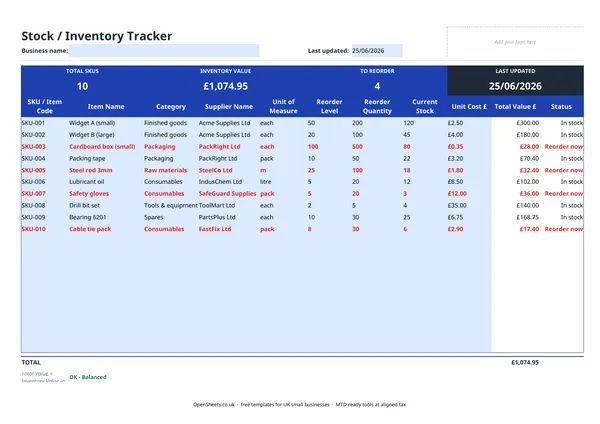
The sheet tracks ten fields per item: SKU or Item Code, Item Name, Category, Supplier Name, Unit of Measure, Reorder Level, Reorder Quantity, Current Stock, Unit Cost, and Total Value. A summary panel at the top shows your total SKU count, overall inventory value in pounds, and how many items are currently below their reorder point.
How the reorder alert works
The Status column is the practical heart of the sheet. When a product’s Current Stock figure falls to or below the Reorder Level you have set, the row turns red and the Status reads “Reorder now”. Items above their reorder level show “In stock” in the standard style.
This means you do not have to scan the whole sheet looking for things that are running low. Sort or filter by Status and you have your reorder list in seconds.
Set the Reorder Level conservatively, taking into account your supplier’s lead time. If a supplier typically takes two weeks to deliver and you sell roughly 20 units a week, a reorder level of 40 gives you just enough cover. A little buffer above that is sensible.
Keeping track of your suppliers
The Supplier Name column links each product to the company you buy it from. For a business with only a handful of products this might seem unnecessary. Once your range grows or you have two or three suppliers for similar items, having the supplier name in the same row as the stock level is genuinely useful. Sort the sheet by supplier to group all your reorders for a single company into one place before raising a purchase order.
If you need to track supplier contact details, payment terms, or account numbers, the OpenSheets purchase order template is a natural companion to this one.
Valuing your stock correctly
The Total Value column multiplies unit cost by current stock quantity for each line. The TOTAL row at the bottom sums these to give you your overall inventory value in pounds.
Two things are worth keeping in mind if you are a UK sole trader.
Stock is a business asset. HMRC expects you to account for the value of unsold stock at the end of your accounting period, and the change in stock value between the start and end of the year affects your taxable profit. Talk to your accountant if you are unsure how to handle this on your return.
Use consistent cost prices. The unit cost should be what you paid for the item, not what you plan to sell it for. If you buy the same product at different prices over time because supplier prices change, a common approach is to use the most recent purchase price or a running average. Ask your accountant which method suits your business.
Common stock-keeping mistakes to avoid
Not updating the sheet when goods arrive or go out. The Current Stock figure is only useful if it is current. Build a quick habit of updating it when deliveries land and when stock is used or sold. A figure that is two months out of date is worse than no figure at all, because it looks accurate.
Setting reorder levels too low. Reorder levels that do not account for supplier lead times mean you will regularly run out before the new stock arrives. When you first set up the sheet, check the typical delivery time for each supplier and work back from your average weekly usage.
Treating all stock the same. High-value items or slow-moving lines that tie up cash deserve closer attention than cheap consumables. The Category column helps here. You might review finished goods weekly and consumables monthly, for example.
Forgetting to write off damaged or lost stock. If goods are spoiled, stolen, or broken, reduce the Current Stock figure and note it. Carrying phantom stock inflates your inventory value and gives you a misleading picture of what you actually have.
Stock records and your tax return
HMRC expects sole traders who hold stock to keep a record of their opening and closing stock values for each accounting period. The total from the bottom of this sheet, taken at your year-end date, is your closing stock figure. If you keep the same sheet updated from the start of the year, last year’s closing value becomes this year’s opening value.
These figures feed into the trading income section of your Self Assessment return as part of your cost of goods calculation. If your records are clean and up to date through the year, completing that section takes minutes rather than hours.
If your combined income from self-employment and property is over £50,000, Making Tax Digital for Income Tax already applies to you from April 2026. The threshold drops to £30,000 from April 2027 and £20,000 from April 2028. Under MTD you keep digital records and send HMRC quarterly updates rather than filing once a year.
A well-kept stock tracker is part of what “digital records” means. If you think Aligned (aligned.tax) might suit you when your MTD start date arrives, it is worth bookmarking. It is free bridging software that sends your records to HMRC from the spreadsheet you already keep.