Who uses a monthly timesheet in the UK
A timesheet does one job well: it records who worked, when, and for how long. Sole traders with staff, small employers paying hourly workers, and contractors billing by the hour all rely on them.
In the UK, timesheets are the most common way to back up hourly pay calculations and to keep an attendance record alongside payroll. They are also useful for project billing, where a client wants to see the hours behind an invoice.
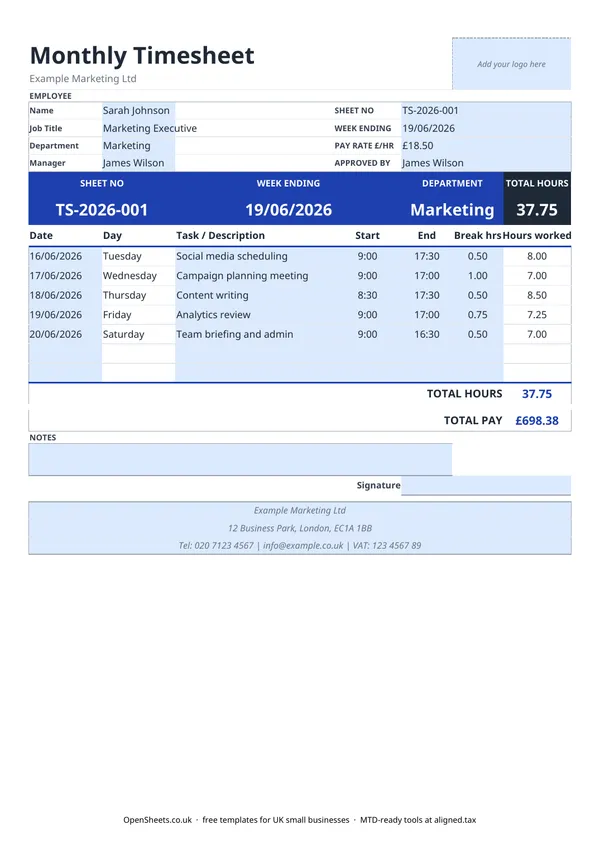
This template covers one employee for one week. It tracks daily start and end times, break time, and hours worked, then calculates total hours and total pay in one go.
What you must record for hourly workers
If you employ hourly-paid staff, you need a clear record of the hours they actually work. That record has to support the payroll figures you run. A signed timesheet, kept alongside your payroll records, is the standard way to do this.
The Working Time Regulations 1998 also place limits on weekly working hours. The default maximum is 48 hours a week, averaged over 17 weeks, unless the worker has signed a valid opt-out. Keeping timesheets means you have the data to check compliance if you ever need to.
For the specific rules on rest breaks, daily rest, night work limits, and young workers, check the HMRC and gov.uk guidance or speak to an HR adviser. The rules depend on the type of worker and their age.
Break time and the 24-hour clock
This template uses 24-hour time. Enter 9:00 for 9am, 13:00 for 1pm, 17:30 for 5:30pm. If you enter 12-hour times, the Hours Worked column will not calculate correctly.
Break time is entered in hours. A 30-minute break is 0.5, a 45-minute break is 0.75, a full hour is 1.0. The template subtracts break time from the total automatically, so your Hours Worked figure reflects time at work, not time on site.
Under the Working Time Regulations, workers are entitled to a 20-minute rest break if they work more than six hours in a day. Check gov.uk for the current rules, as the entitlement varies for young workers.
Sheet numbering
The Sheet No field at the top (for example TS-2026-001) gives each timesheet a unique reference. This makes it easy to match a timesheet to a payroll run or a specific invoice. A simple pattern is employer initials, the year, and a running number. Pick a format and stick with it.
Common mistakes to avoid
Using 12-hour time. The Hours Worked formula expects 24-hour entries. A 9:00 to 17:00 shift with a 0.5 break gives 7.5 hours. If you enter 9:00 AM and 5:00 PM instead, the calculation breaks. Use 24-hour format throughout.
Leaving the Pay Rate blank. If you skip the Pay Rate £/hr field, the Total Pay cell shows zero. Fill it in at the start of each sheet, or the pay figure will not mean anything.
Not getting a signature. A timesheet without a signature is just a spreadsheet with numbers. A manager or the employee signing it turns it into a record both sides agree on. That matters if there is ever a dispute about hours or pay.
Running timesheets for the wrong period. The Week Ending date sets the context for the whole sheet. Make sure it matches the dates in the daily rows, especially if a week spans the end of one month and the start of the next.
Timesheets and your tax records
If you run payroll, HMRC expects you to keep records of all payments to employees, including the hours and the rate. Timesheets are one of the standard ways to do that. Keep them alongside your payroll records for the full period HMRC requires, currently at least three years after the end of the tax year they relate to. Check the current guidance on gov.uk if you are unsure.
For self-employed contractors billing by the hour, a timesheet per client and per week is a clean way to show the work behind each invoice. It also makes the income side of your self-employment records easy to reconstruct if HMRC ever asks.
If your combined income from self-employment and property goes over £50,000, Making Tax Digital for Income Tax applies to you from April 2026. The threshold drops to £30,000 from April 2027 and £20,000 from April 2028. When that happens, Aligned (aligned.tax) is worth a look. It is free MTD bridging software that sends your records to HMRC straight from the spreadsheet you already keep.