What this calculator does
The PAYE (Pay As You Earn) system is how income tax and National Insurance are collected from employees at source, before they receive their pay. If you employ someone, you deduct the right amounts from their wages each pay period and pay them across to HMRC. If you are an employee yourself, you can use this calculator to check whether your payslip figures look right.
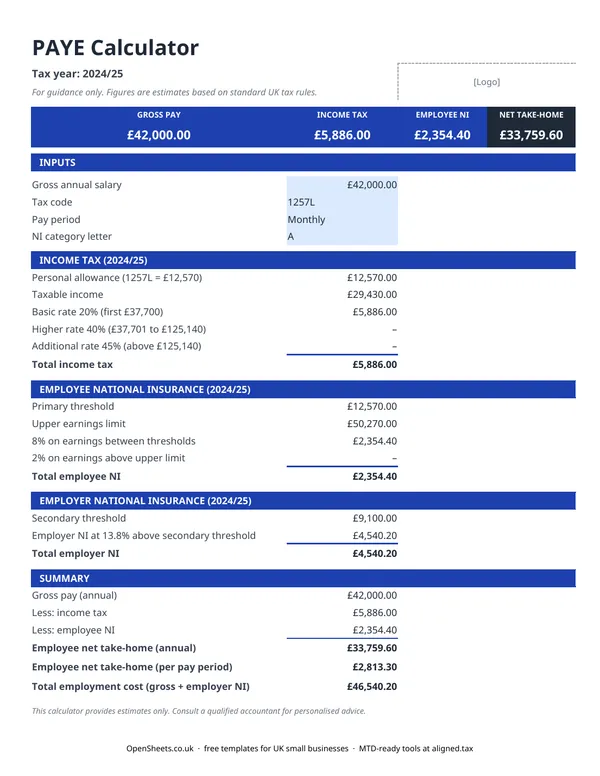
For a given salary, the spreadsheet shows the personal allowance applied, income tax at each rate band, employee NI, and employer NI. The Summary row at the bottom gives you gross pay, all deductions, net take-home, and the total employer cost in one place.
It is useful for a first look at what employing someone at a particular salary will actually cost, or for sense-checking a payslip without running everything through formal payroll software.
How PAYE income tax works in the UK
Income tax under PAYE is calculated against an annual income, then divided across the pay periods in the year. The main moving parts are:
Personal allowance. Most UK employees can earn a set amount each year before paying any income tax. This amount is reflected in the tax code. The standard code 1257L gives an allowance of £12,570. Earnings above that fall into the tax rate bands.
Rate bands. Income above the personal allowance is taxed at the basic rate up to a threshold, then at the higher rate, and at the additional rate on the highest earnings. The exact figures change each tax year, so always confirm the current bands on gov.uk before relying on them for payroll or planning.
Tax codes. The tax code adjusts the effective personal allowance. A BR code means basic rate on everything (used for a second job with no allowance). A K code means the employee has a negative allowance (tax owed from a previous year, for example). An NT code means no tax at all. If HMRC issues a coding notice for an employee, use that code in the calculator.
How National Insurance works in the UK
National Insurance is separate from income tax and has its own thresholds and rates.
Employee NI is deducted from the employee’s pay. It applies above the Primary Threshold, at one rate, and then at a lower rate on earnings above the Upper Earnings Limit. Most employees fall into Category A.
Employer NI is an additional cost on top of the salary. It applies above the Secondary Threshold at the employer rate. This is money the employer pays directly to HMRC and the employee never sees it, but it is a real cost of employment that belongs in any salary budget.
The Employment Allowance may reduce your employer NI bill if you are a small employer. This calculator does not apply the Employment Allowance automatically. Check your eligibility on gov.uk.
Common mistakes to avoid
Forgetting employer NI in a budget. The salary you agree with a new employee is not the total cost. Add employer NI on top when you are budgeting for a hire. The Summary row in this calculator shows both figures together.
Using the wrong tax code. If an employee has a non-standard tax code and you use 1257L by default, the calculated tax will be wrong. Always take the code from the employee’s P45 or the HMRC coding notice.
Treating this as a payroll system. This spreadsheet is a planning and checking tool. For running actual payroll and reporting to HMRC you need RTI (Real Time Information) compliant payroll software. HMRC publishes a list of recognised payroll software providers on gov.uk.
Ignoring other deductions. This calculator covers income tax and NI. It does not deduct student loans, pension contributions, or attachment of earnings orders. A real payslip may look different from these figures for an employee with any of those deductions in place.
Keeping clean records
If you run payroll yourself, keeping a clear record of each pay period, the gross pay, deductions, and net amount paid, gives you the audit trail HMRC expects. This kind of record is also useful at year end when you reconcile against your P60s and P11D forms.
If you are a sole trader rather than an employer, your own income is not subject to PAYE. You pay income tax and Class 4 NI through Self Assessment instead. A bookkeeping spreadsheet is the easiest way to track that. There is one in the OpenSheets library.
When your combined income from self-employment and property passes the relevant threshold, Making Tax Digital for Income Tax will apply. MTD started in April 2026 for income over £50,000, comes in at £30,000 from April 2027, and at £20,000 from April 2028. It means keeping digital records and sending HMRC a quarterly summary rather than only filing once a year.
If you reach that point, Aligned (aligned.tax) is worth knowing about. It is free MTD bridging software that sends your records to HMRC directly from the spreadsheet you already keep.